Best CRM for Small Business: How to Pick One in 2026

The best CRM for a small business is the one your team will actually open every morning. For most teams that means a tool that is easy to learn, priced per user in a way you can predict, and flexible enough that you don’t outgrow it in a year. Below we compare the main options, including ours, and show how to match one to your size and process.
What a small business actually needs from a CRM
Strip away the marketing and a CRM does four jobs: it stores companies and contacts, tracks opportunities through a pipeline, logs activities and tasks, and shows you what is going on in a dashboard. Everything else is a bonus, and often a bill.
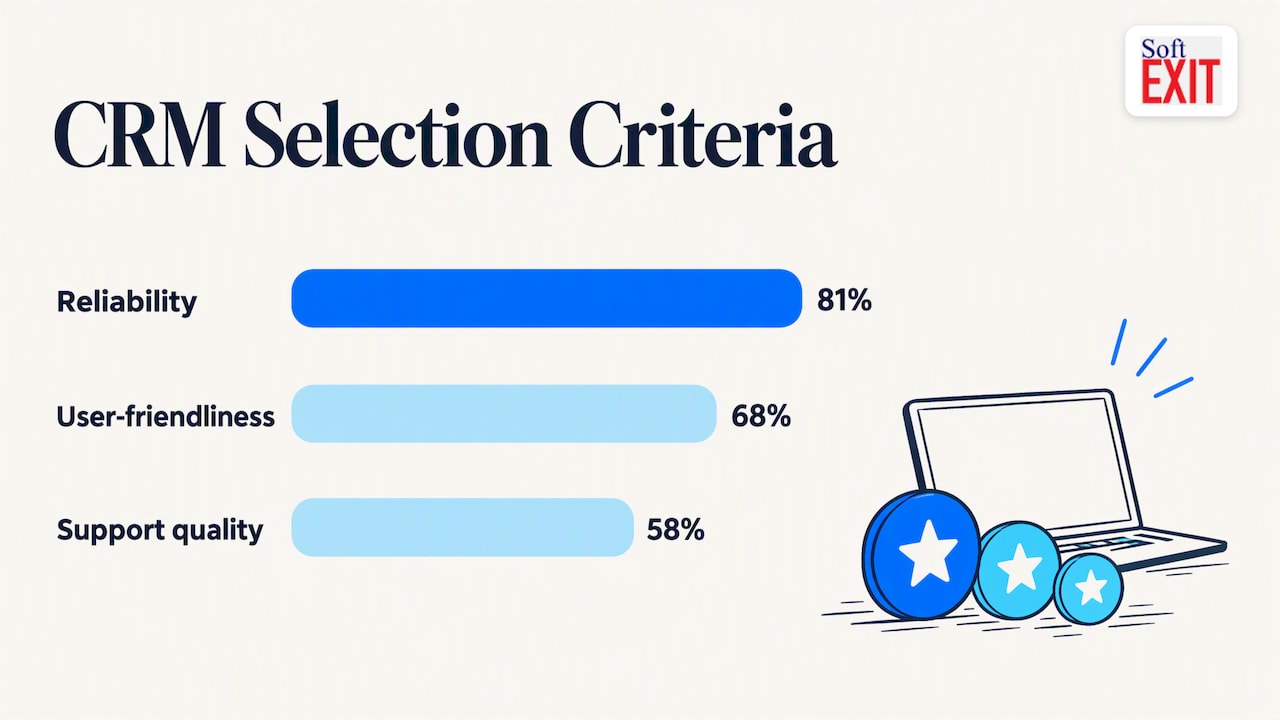
Researchers who surveyed small and midsize firms found the top selection criteria were reliability (81%), user-friendliness (68%) and quality of support (58%). Notice what is missing: a giant feature list. Fit with how you really sell matters more.
So before you open a single pricing page, write down three things:
- Your pipeline stages, in plain words (Lead, Qualified, Quote sent, Won, Lost).
- Who needs access, and who should not see what (sales reps, owner, accounting).
- What else lives in spreadsheets today that you would love to pull in later.
How much does a CRM cost for a small business?
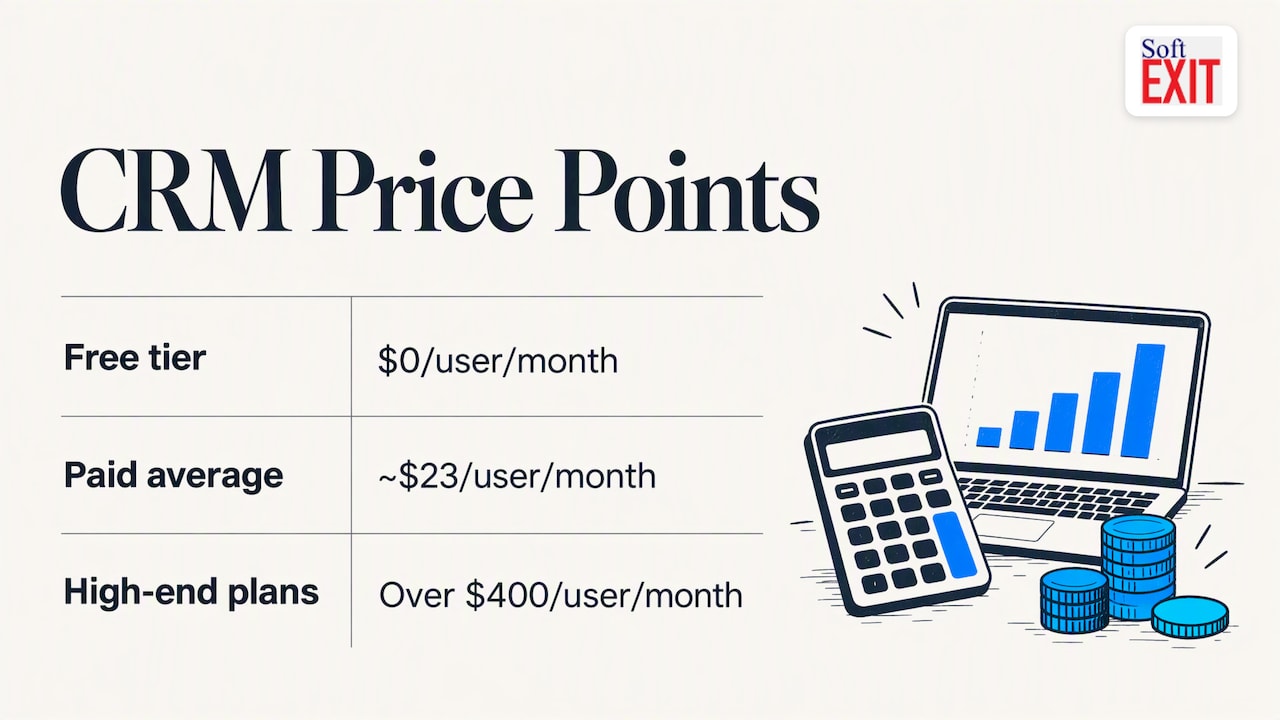
Most vendors charge per user per month, so the math is headcount times the monthly base price. Capterra’s 2026 roundup puts the range from $0 for entry-level free tiers to well over $400 for high-end plans, with entry-level paid plans averaging roughly $23 per user per month in older Forbes Advisor data. Annual commitments usually bring a discount.
A quick sanity check for a team of eight on a $24 per user plan: 8 x $24 = $192 a month. That is a number you can budget. Add-ons, onboarding fees and middleware are where the surprises hide.
Best CRM options for small business, compared
Here is how the names that keep showing up stack up. Pricing changes, so confirm it on each vendor’s site before you buy.
| CRM | Best for | Pricing notes | Watch out for |
|---|---|---|---|
| HubSpot CRM | An all-in-one free start | Free tier; Starter reported at $15 per seat on annual billing | Costs jump when you add automation and marketing tiers |
| Zoho CRM / Bigin | First-time buyers, tight budgets | Free for up to 3 users; Bigin is aimed at first-time buyers | More setup as needs grow |
| Less Annoying CRM | Solo operators and very small teams | Simple, flat approach | Limited depth for complex processes |
| Pipedrive | Pipeline-focused sales teams | Per-user tiers | Narrower beyond sales |
| monday CRM | Teams that already think in visual boards | Per-seat tiers | Can feel like a project tool first |
| SoftEXIT CRM | Teams with their own process who want room to grow | Starter $14 per month per user; Professional $24 per month per user | Enterprise has no published price |
Capterra names Bigin by Zoho CRM as best for first-time buyers, Less Annoying CRM for solo operators, HubSpot CRM for an all-in-one free start and monday CRM for visual teams. Those labels are fair. If you are one person with a few hundred contacts, a free or flat-rate tool may be all you need.
Where free CRMs stop being free
Free plans are a good way to learn what you want. They are a poor place to run a growing sales team. Limits show up on seats, contacts, automation or reporting, and the upgrade step is often steeper than the first price suggests.
There is also the integration tax. A CRM that doesn’t talk to your accounting or internal tools pushes you toward middleware or manual copy and paste. If you are already weighing that, our breakdown of Zapier task costs and when to consolidate shows the math.
A short story about the spreadsheet that ran the company
Picture a ten-person landscaping supplier. Their “CRM” was a spreadsheet named Customers_FINAL_v7_REALFINAL. Dana in sales kept one copy, Mike in the yard kept another, and the owner swore by a third on his phone. One Monday, a $40,000 quote went out to a customer who had been marked “do not contact” in exactly one of the three files. Nobody was fired. Everybody agreed, over stale donuts, that the file was the problem, not the people. That was the week they went shopping for a CRM.
This is a composite scenario, not a named customer. It is also the most common reason small teams buy a CRM: not ambition, just too many versions of the truth.
Perspective: why we think flexibility beats a bigger feature list
We build SoftEXIT CRM on SoftEXIT Studio, a no-code application platform, and that shapes how we see this market. Most CRMs make you bend your process to fit their screens. Small businesses rarely have a textbook process. You might track equipment on every deal, or need a contract renewal date next to every account, or want some fields hidden from certain roles.
Analysts are noticing the same pressure. Forrester’s Kate Leggett argues that CRM must be rebuilt with AI at the core rather than having AI bolted onto legacy designs, and Forrester’s wider guidance tells buyers to beware legacy vendors bearing AI gifts. Our view: pick a foundation you can reshape yourself, with role-based security, protected fields and dashboards you configure rather than request.
The other half is honesty. A no-code platform still needs you to define the process first. Copy a messy spreadsheet into any tool and you get an expensive, prettier mess. Do the cleanup, then build.
— James Edgell
Where SoftEXIT CRM fits
SoftEXIT CRM manages companies, contacts, opportunities, sales pipelines, activities, tasks and customer service in one place. Because it runs on a no-code platform with AI-driven configuration, you can adjust forms, dashboards and workflows without a developer. When you are ready, the same platform can take on inventory, contract tracking or risk management, so you are not stitching together separate subscriptions.
Pricing is per user: Starter is $14 per month per user and Professional is $24 per month per user. Enterprise is priced on request. If you want help setting things up, Professional Services covers implementation and configuration.
Comparing against a specific tool? We have side-by-side pages for HubSpot, Pipedrive and Salesforce. To see role-based views, read how to build CRM dashboards without code.
What about midsize businesses?
As you pass a few dozen users, the questions change. Permissions, auditability, reporting across teams and integrations start to matter more than a clean mobile app. Ask vendors how they handle hierarchical data (parent companies, subsidiaries, locations), who can see which fields, and what happens when you want a custom object. If the answer is “buy the next tier” every time, price that out for three years, not three months.
How to choose in five steps
- Map your process. Write your pipeline stages and the data you capture at each one.
- Clean your data. Research on SMEs found only 68% were actually working on the data they collect. Deduplicate before you import, not after.
- Shortlist three tools. One free-tier option, one pipeline specialist, one flexible platform.
- Run a 30-day pilot with two or three real users and real deals. Our onboarding workflow and pilot template can help structure it.
- Decide on total cost. Seats, add-ons, onboarding and integrations, over 12 to 36 months.
Get leadership to use the tool visibly. If the owner still asks for numbers by text, the CRM turns into a graveyard of stale contacts fast.
FAQ
What is the simplest CRM to use?
For first-time buyers, Capterra points to Bigin by Zoho CRM, and to Less Annoying CRM for solo operators. Simple also means a short setup: if your process is standard, a lightweight tool wins. If it isn’t, a configurable one saves rework.
Which CRM is free for small business?
HubSpot offers a free CRM, and Zoho CRM’s free plan supports up to 3 users. Free plans are usually capped on seats, contacts or features, so check the limits against your team before you import data.
How much does CRM cost for a small business?
Expect to pay per user each month. Entry paid plans commonly run in the teens to mid-$20s per user, and ours run $14 (Starter) and $24 (Professional). Multiply by your headcount, then add any onboarding or add-on fees.
Can a no-code platform replace a traditional CRM?
For many small teams, yes, as long as you define your process first. You get a CRM shaped to your workflow, plus room to add other business apps later on the same platform.
Sources
- Best CRM Software 2026: 8 Top Picks Reviewed, Capterra
- The Best Practice of CRM Implementation for Small- and Medium-Sized Enterprises, MDPI
- CRM Pricing Guide, Forbes Advisor
- AI Catapults The CRM Market To A Moment of Reckoning, Forrester
- The Seventh Wave: How AI Will Change The Technology Industry, Forrester
- HubSpot Pricing Explained (2026), TinyCommand