Pipedrive vs HubSpot (and Zoho): Which CRM Fits Your Team?

Pipedrive is the better pick if your team mostly needs to move deals through a pipeline and get live fast. HubSpot is the better pick if marketing, sales and support all need to share one set of customer data and you can pay for that depth. Zoho sits between them on price and customization, with a steeper learning curve. And if none of the three quite match how you actually sell, there is a fourth route we’ll cover below: a no-code CRM you shape yourself.
The real difference: sales speed or platform scale
Analysts keep landing on the same framing: this is a choice between specialized sales velocity and platform-wide scalability. Pipedrive was built around the deal board. You drag a deal from one stage to the next, log the next activity, move on. HubSpot started as a marketing tool and grew into a suite, so its CRM sits next to email campaigns, content, service tickets and reporting.
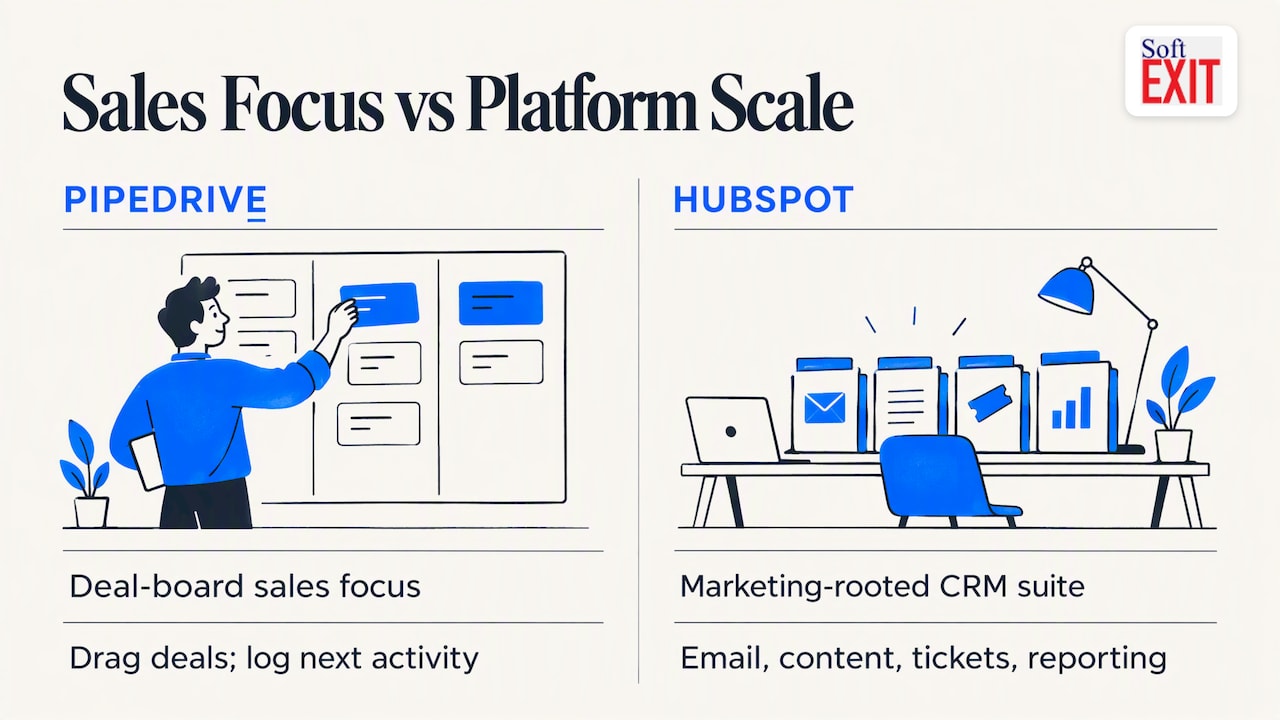
Neither approach is wrong. The trouble starts when the tool doesn’t match the team. A five-person sales crew can drown in HubSpot’s multi-hub setup. A growing company with a marketing team can outgrow Pipedrive’s narrow scope in about a year.
Pipedrive vs HubSpot at a glance
| Pipedrive | HubSpot | Zoho CRM | |
|---|---|---|---|
| Best for | Sales teams that live in the pipeline | Companies aligning marketing, sales and service | Teams wanting deep customization on a budget |
| Ease of setup | Fastest of the three | Easy to start, heavier as you add hubs | Moderate, more to configure |
| Entry price | $14 per user per month, annual | Free CRM, paid seats from about $20 per month | Typically lower than HubSpot; check Zoho’s current page |
| Watch out for | Narrow beyond sales | Onboarding fees and tier jumps | Learning curve |
Prices move, and vendors raised several in recent years. Treat any figure here, ours included, as a starting point and confirm on the vendor’s pricing page before you budget.
Pricing: where the surprises hide
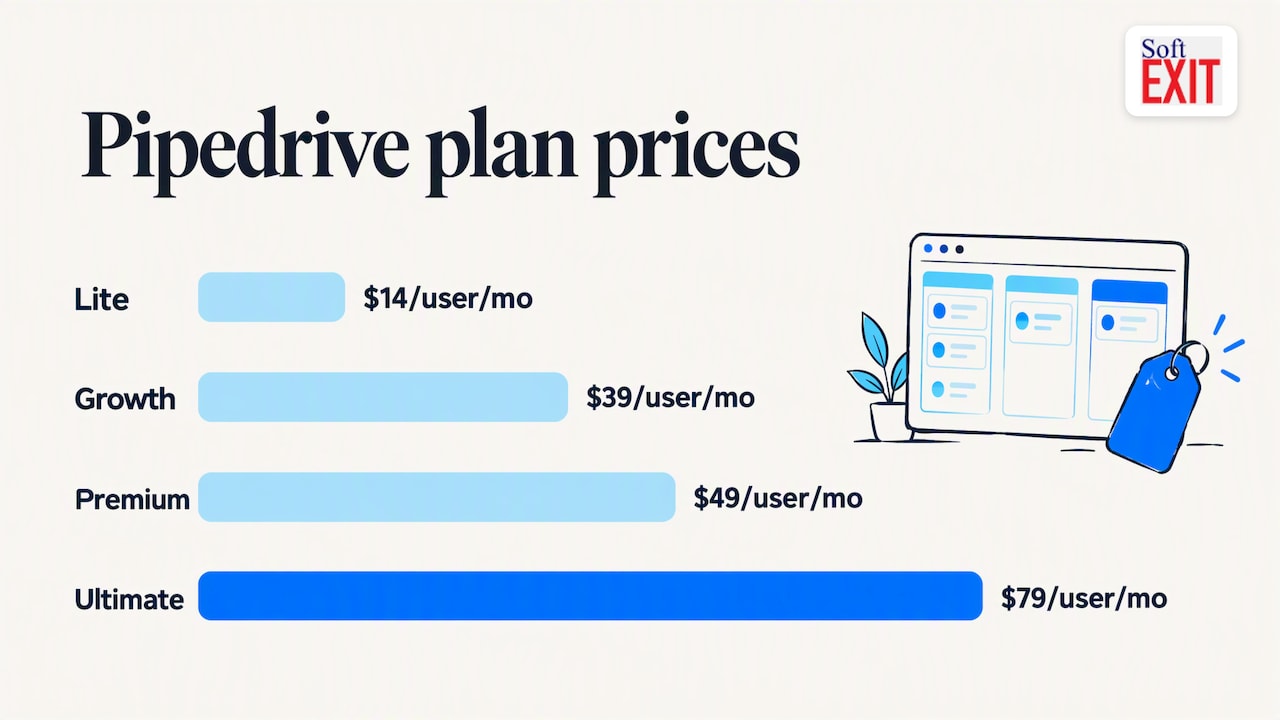
Pipedrive’s ladder is simple to read. According to Capterra, Lite is $14 per user per month billed annually, with Growth at $39, Premium at $49 and Ultimate at $79. Monthly billing costs more, and reviewers say some advanced features and add-ons cost extra.
HubSpot’s free CRM is real, and it’s a fine place to start. The sticker shock comes later. One 2026 comparison reports that Professional tiers can require a platform fee near $450 per month plus an onboarding charge around $1,500, which can nearly double the true first-year cost of a subscription. Ask for the all-in first-year number in writing, not the headline seat price.
Zoho usually undercuts HubSpot per user, but you pay in setup hours. Budget for someone to own the configuration.
Ease of use and getting live
User reviews consistently praise Pipedrive for ease of use and pipeline simplicity, while HubSpot gets the nod from growing businesses that want integrated marketing, service and deeper segmentation. Industry experts also warn that teams often underestimate the learning curve of HubSpot’s multi-hub architecture.
One more thing that has nothing to do with software. The biggest mistake we see is copying the old spreadsheet process into the new CRM instead of using the move to clean up how you work. Pick the tool, then fix the process. Doing both at once is how projects stall.
A quick story about the spreadsheet
A sales manager we’ll call Dana had a pipeline spreadsheet with eleven tabs, three color codes nobody could decode, and a column labeled “maybe??”. When she finally demoed a CRM, the rep who owned the sheet asked where the “maybe??” column went. Dana said it was now called “stage.” He stared at the board for a minute, moved one deal to Closed Won, and quietly asked if he could keep a copy of the old file “just in case.” Reader, he did. For about six weeks. Then the tab count dropped to zero and nobody missed it.
Automation, reporting and AI
HubSpot goes deeper here. Zapier’s 2026 comparison finds that HubSpot has the more impressive AI features, while Pipedrive is better value for sales-focused teams. Pipedrive’s reports are easier to build; HubSpot’s go further once your data is clean.
The practical test: list the three reports your leadership asks for every month. If Pipedrive or Zoho produces them out of the box, you don’t need to pay for depth you won’t use.
Moving from spreadsheets: do this before you pick
Whatever you choose, the import is where most projects wobble. Practitioners advise cleaning, deduplicating and standardizing the data first, then writing a mapping document that says which column becomes which CRM field. Start with a small, representative batch of 50 to 100 records, test the import, then scale up.
Adoption is the other half. Reps who can run a tight discovery call tend to log better notes, so it’s worth practicing your call script with a teleprompter-style tool while the new system is still unfamiliar. If you want a structured rollout, our 30-day pilot and onboarding workflow gives you templates to copy.
How to choose
-
Choose Pipedrive if your team is under about 15 people, sells to a defined pipeline, and wants to be live this month.
-
Choose HubSpot if marketing and service need the same records as sales, and you’ve priced the onboarding fee.
-
Choose Zoho if you want custom fields and process logic and have someone willing to configure them.
-
Look at a no-code CRM if you keep saying “we’d use it, but our process is different.”
Our perspective: the CRM should bend, not you
We build SoftEXIT CRM on SoftEXIT Studio, our no-code application platform, so we have a bias, and we’ll state it. Most CRM regret we hear about is not about missing features. It’s about rigid ones. The team’s real process has an odd approval step, a contract date that drives renewals, or a field only finance should see, and the CRM has no room for it.
That’s why we think of a CRM as the first application on a platform, not a closed box. With role-based security, protected fields, dashboards and forms you configure yourselves, with AI helping with the setup, the same system can later grow into contract tracking, inventory or risk management without a second vendor. You can see how that compares directly on our pages for SoftEXIT CRM vs HubSpot and SoftEXIT CRM vs Pipedrive Growth. If Pipedrive or HubSpot fits you cleanly, use it. If you keep fighting it, that’s our cue.
— James Edgell
Where SoftEXIT CRM fits
SoftEXIT CRM covers companies, contacts, opportunities, pipelines, activities, tasks and customer service. Pricing is per user: Starter is $14 per user per month and Professional is $24 per user per month, with Enterprise priced on request. If you want help with setup, there are optional professional services. Start with the SoftEXIT CRM page or watch the walkthrough. Still weighing options? Our guide to HubSpot alternatives for growing teams goes further.
FAQ
Is Pipedrive cheaper than HubSpot?
Per paid seat, usually yes at the entry level, and Pipedrive’s pricing is easier to predict. HubSpot has a free CRM, though, and its costs jump at Professional once platform and onboarding fees apply. Compare first-year totals, not seat prices.
Is HubSpot or Zoho better for a small business?
HubSpot is easier to start with and has a free tier. Zoho generally costs less per user and offers more customization, but expects more configuration time. If nobody on your team will own setup, lean HubSpot or Pipedrive.
What are the disadvantages of Pipedrive?
It’s narrow by design. G2 reviewers note it lacks some advanced CRM depth, and automation and email campaign features are lighter than a marketing suite. Some add-ons also cost extra.
Can I switch later if I pick wrong?
Yes, and clean data makes it far less painful. Keep your mapping document and a regular export, and any move becomes a re-import rather than a rebuild.