Spreadsheet to App: How to Make the Move Without Losing Data

To turn a spreadsheet into an app, clean the data, decide what the app must do that the sheet can’t, and build forms, views and permissions on top of a real database. A no-code platform lets you do all of that without writing software. Most teams get stuck on the people and data side, not the tool. This guide covers both.
Key takeaways
-
A spreadsheet becomes an app when you add structure: validated fields, forms, roles, dashboards and workflows on top of a database.
-
Clean first. Importing a messy sheet gives you a messy app, only faster.
-
Involve the people who use the sheet every day, or they will build workarounds around your new system.
-
Pilot one process, not the whole company. Pick the sheet that causes the most Friday-afternoon pain.
-
No-code keeps the flexibility users like about spreadsheets while enforcing the data standards the business needs.
When a spreadsheet stops being enough
Spreadsheets are great. Excel and Numbers run on both iOS and Android, and Excel for the web is free. That is exactly why every team ends up with twelve of them.
The trouble starts when a sheet becomes a system. Watch for these signs:
-
Two people edit “the latest version” and one overwrites the other.
-
You find three spellings of the same customer.
-
Only one person understands the formulas, and they are on vacation.
-
You need different people to see different columns, and the only tool you have is a hidden tab.
-
Someone asks for a dashboard and you spend a day copying and pasting.
Spreadsheets are also hard to verify. A NIST-hosted best practice guide on testing spreadsheet applications exists because spreadsheets used as applications need to be validated like software. Few teams do that, and it shows once the data grows.
What “spreadsheet to app” really means
People use the phrase for three different jobs. Know which one you are doing.
| Goal | What you build | Good fit when |
|---|---|---|
| Mobile view of a sheet | A read-and-update screen on phones | One person needs field access to a small list |
| Internal business app | Database, forms, roles, dashboards, workflows | A team shares and edits the data daily |
| Full system (CRM, inventory, contracts) | Several linked apps on one platform | The sheet is already the system of record |
The second and third rows are where most small and midsize businesses land. A quick phone wrapper around a sheet still leaves you with loose entry and no real permissions. A database-backed app fixes those.
Step by step: from sheet to working app
1. Clean the data before you move it
This is the step teams skip. Spreadsheets allow loose entry, so you get “spreadsheet drift”: broken formulas and misspellings multiplying. Standardize naming, merge duplicates, and decide which columns should become picklists rather than free text. Garbage in, garbage out applies with full force.
2. Define the process, not just the columns
Write down who enters data, who approves it, who only needs to read it, and what should happen next. A sales sheet, for example, is really a pipeline: lead, qualified, proposal, won or lost. Those stages become a field with fixed values, and the next action becomes a task or automation.
3. Build preventive controls
A sheet checks nothing at entry. An app can. NIST’s manager’s guide to data integrity points to controls at the point of entry, like range and format checks, rather than auditing after the fact. Required fields, date validation and protected fields do that work for you. This is the biggest upgrade you get from moving.
4. Let users shape it
People love spreadsheets partly for free-text notes. NIST research on categorization errors in work-order data entry shows what happens when categories don’t match how people think: inconsistent entries and workarounds. Ask your reps or techs to review the categories before launch. Keep a notes field. Rigid is fine; irritating is not.
5. Pilot, then expand
Start with one team and one sheet. Run both in parallel for a couple of weeks, fix what is annoying, then retire the sheet. Make it read-only on a set date, or it will live forever.
A short story about the Friday merge
Picture a sales manager, call her Dana, who inherited a pipeline workbook with 14 tabs. Every Friday she spent two hours merging cells and chasing reps for updates. One rep kept his numbers in a tab named “final_v7_REAL.” Another used color coding only he understood, so a green row meant “hot” to one person and “paid” to another. Dana’s forecast was, charitably, a group art project. The week after the team moved to an app with a required stage field and a shared dashboard, she opened the forecast on a Friday at 2 p.m. and found nothing left to merge. She spent the time at lunch, which in sales counts as a minor miracle. (This is an illustrative scenario, not a client case.)
How SoftEXIT approaches it
SoftEXIT Studio is a no-code, AI-assisted application platform. You describe what you need and configure databases, forms, dashboards, reports and workflows without traditional development. Role-based security, protected fields, hierarchical data and automated data intake are built in, which covers most of the preventive controls above.
If your spreadsheet is really a customer list and pipeline, start with SoftEXIT CRM. It manages companies, contacts, opportunities, pipelines, activities and tasks, and because it sits on the same platform you can later add inventory, risk management or contract tracking without switching vendors.
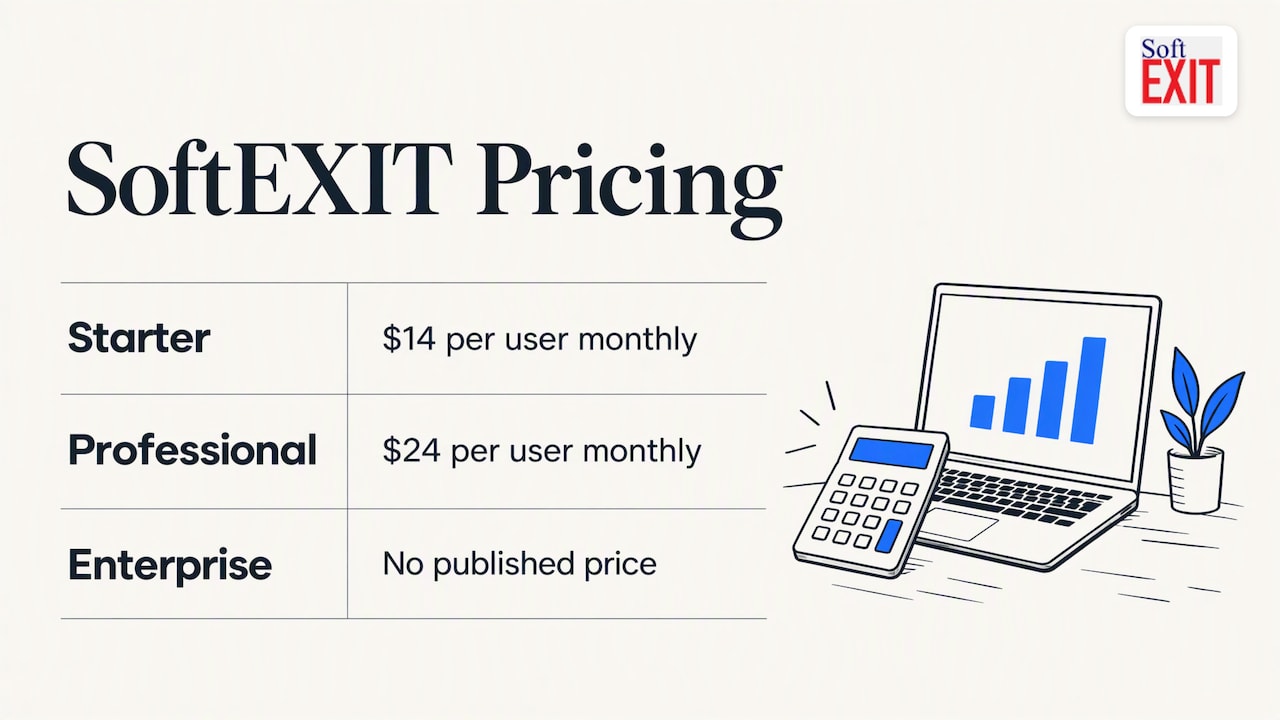
Pricing is published per user: Starter is $14 per month per user, and Professional is $24 per month per user. Enterprise has no published price. If you would rather not do the configuration yourself, there are professional services for implementation and setup.
Our perspective
We see the same pattern again and again. A team doesn’t want a new tool. It wants the sheet to stop breaking. The mistake is replacing the spreadsheet with something rigid and generic that forces everyone into someone else’s idea of their job.
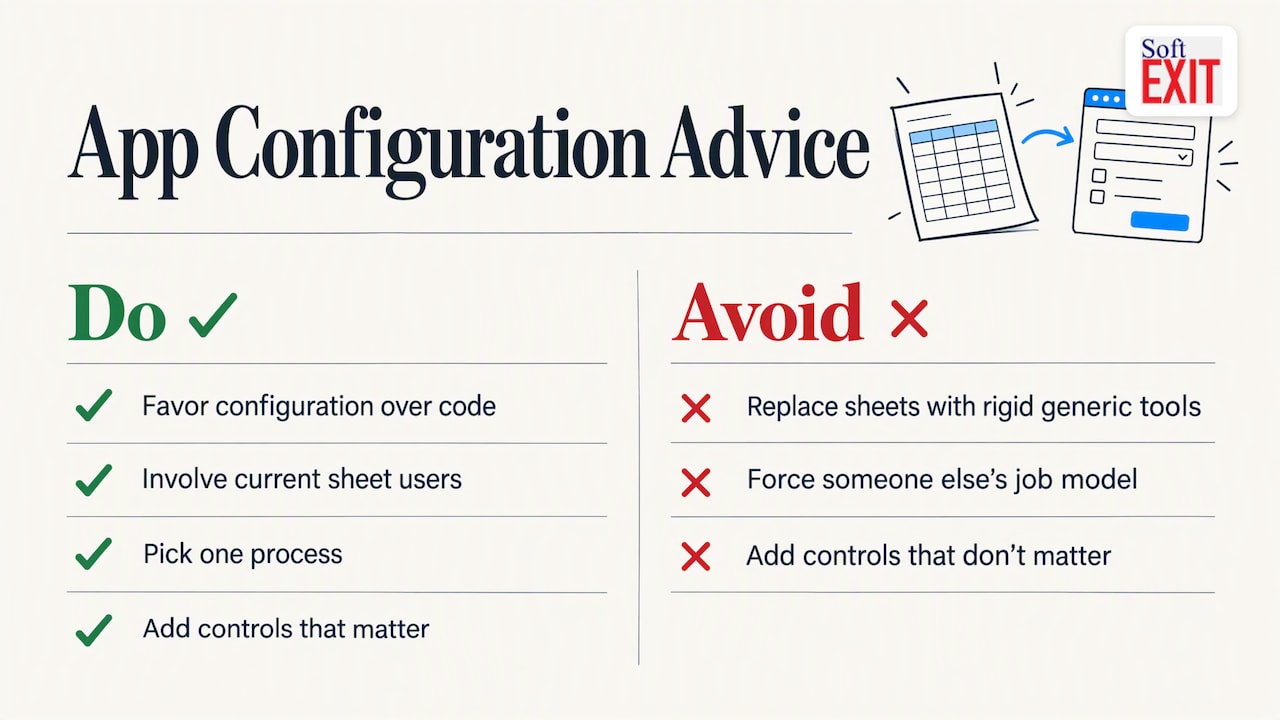
We built SoftEXIT around the opposite idea: the application should bend to the process. That is why we favor configuration over code, and why we suggest involving the users who live in the sheet today. They know where the real fields are, and they will tell you which ones are fiction.
Our advice is practical. Pick one process. Clean the data. Add the controls that matter, such as picklists, required fields and roles, and skip the ones that don’t. Go live in days, not quarters, then grow from there. If you outgrow a single app, the platform grows with you. If you are comparing options, we’ve written honest breakdowns against Airtable, Microsoft Power Apps, Quickbase and Kintone. For the database side, our guide on building a business database in no-code goes deeper.
— James Edgell
Ready to retire the workbook?
Take the one sheet your team fights with most and rebuild it as an app. You can look at the SoftEXIT CRM walkthrough first to see what a finished pipeline looks like, then compare plans on the SoftEXIT Studio page.
FAQ
Can I turn an Excel spreadsheet into an app without coding?
Yes. A no-code platform lets you import your columns, define field types, then add forms, views, dashboards and permissions by configuration. Clean the data first so you don’t carry errors over. Most teams can pilot a single sheet in days.
Should I keep using the spreadsheet alongside the app?
Only during a short parallel run, ideally a couple of weeks. After that, make the sheet read-only. If both stay live, people will update the wrong one and you will have two versions of the truth.
What is the best spreadsheet replacement for a small team?
It depends on the job. If the sheet tracks customers and deals, a CRM is the natural replacement. If it tracks inventory, contracts or risks, a flexible no-code platform lets you build exactly that. Pick something that can grow so you don’t migrate twice.
Is Excel a Microsoft app, and can I use it on my phone?
Yes. Excel is Microsoft’s spreadsheet application, and Excel is available on iOS and Android, with an account required on mobile. On iPhone you can also use Apple Numbers. Those are fine for personal lists, but not for shared team processes.
Sources
-
Testing Spreadsheet Applications, NPL Best Practice Guide No. 7 (NIST)
-
A manager’s guide for monitoring data integrity in financial systems (NIST)
-
Categorization Errors for Data Entry in Maintenance Work-Orders (NIST)