Onboarding Workflow for Implementers: Templates and a 30 Day Pilot

A customer onboarding workflow is the repeatable sequence that moves a new customer from signed contract to confident, successful product use, structured across pre-onboarding, onboarding, and post-onboarding stages. The single rule that should guide every design choice is to anchor the whole workflow around the first-value milestone, the measurable point where the customer gets real benefit, and to track time to first value from day one.
TL;DR:
- The success of onboarding depends heavily on tracking the time to reach the first-value milestone, which varies from minutes in self-serve to weeks in enterprise setups.
- A documented sales-to-onboarding handoff that includes promises, success criteria, stakeholder maps, and deadlines is the most common point of failure and must be assigned to a specific owner with a deadline.
- Using conditional paths based on contract value, integration complexity, and security needs helps tailor onboarding efforts efficiently to different customer segments.
- Automating reminders, CRM updates, and escalation rules supports workflow health, but judgment calls for exceptions still require human oversight.
- Key metrics for onboarding health are activation rate, time to first value, completion rate, and onboarding churn, which guide improvements and scale support effectively.
Table of Contents
- What counts as a customer onboarding workflow
- Why onboarding matters: the business case and the metrics to watch
- Step-by-step customer onboarding workflow from pre-onboarding through handoff
- Reusable templates and checklists for each stage
- Segmentation and conditional paths: how to route customers by need
- Metrics, monitoring, and automation to keep onboarding healthy
- Sales-to-onboarding handoff: the single highest-risk moment
- Examples and mini-templates: three sketchable workflows
- How SoftEXIT Studio and SoftEXIT CRM can implement the workflows described
- Lessons from building these workflows in practice
- Get your onboarding workflow running with SoftEXIT
- FAQ
- Sources
What counts as a customer onboarding workflow
A customer onboarding workflow covers everything from the moment a deal closes to the point a customer is fully self-sufficient. It splits into three stages: pre-onboarding (intake, data collection, scheduling), onboarding (kickoff, configuration, training, first use), and post-onboarding (adoption checks, expansion, renewal prep). A customer onboarding process that skips pre-onboarding intake tends to lose time in the kickoff meeting chasing information that should have been collected earlier.
The shape of the workflow changes with deal complexity. A self-serve SaaS signup needs almost no human touch, while an enterprise account with multiple stakeholders, security reviews, and custom integrations needs a structured, multi-week plan.
- Self-serve: automated emails and in-app guidance, no human handoff.
- Low-touch: a single onboarding specialist runs a short guided setup.
- High-touch: a dedicated onboarding manager coordinates kickoff, configuration, and training over several weeks.
- Enterprise: multiple stakeholders, security and legal review, phased rollout across teams.
“Done” means the customer has reached a defined, measurable outcome, not simply that a checklist got closed out. That outcome, the first-value milestone, is the acceptance criterion the whole workflow should be judged against.
Why onboarding matters: the business case and the metrics to watch
Onboarding is where the relationship either compounds or quietly erodes. A customer who reaches value fast tends to renew, expand, and refer; a customer who struggles through a confusing setup often churns before the first invoice renews, and support teams absorb the cost of that confusion for months afterward.
Documented sales-to-onboarding handoff failures are the most common cause of onboarding breakdowns, according to practitioner guidance built into onboarding process templates. When promises made during the sales cycle never make it into the onboarding record, the new customer has to repeat context, and trust erodes before the relationship has really started.
Four metrics matter more than the rest:
- Activation rate: the share of new customers who complete the actions that define real product use.
- Time to first value: how long it takes a customer to reach the milestone that proves the product works for them.
- Completion rate: the percentage of customers who finish the defined onboarding workflow rather than dropping out partway through.
- Onboarding churn: the share of customers lost during or shortly after onboarding, before they ever reach steady-state use.
A workflow built around these four numbers also lowers support volume, because customers who finish a well-designed onboarding path ask fewer repetitive questions later, and it lets a team scale onboarding headcount more slowly than the customer base grows.
Step-by-step customer onboarding workflow from pre-onboarding through handoff
A reusable onboarding workflow needs explicit owners, explicit tasks, and explicit conditional branches, not a loose checklist. Process Street’s onboarding template guidance recommends building in automations, conditional logic, and an audit trail so any team member can see what happened and who did it, which matters as much for a five-person team as for a hundred-person customer success org.
Here is a workflow you can adapt directly.
- Pre-onboarding intake. Collect predictable, required information before scheduling kickoff: primary contact, billing contact, user list, required integrations, security requirements, and any signed agreements. Moving this intake earlier avoids the common failure of burning a kickoff call on information-gathering instead of planning.
- Sales-to-onboarding handoff. Require a documented handoff record in the CRM: customer goals, promises made during the sales cycle, stakeholder map, and any deadlines. This single step addresses the most common onboarding failure point, which is information lost between the sales team and the onboarding team.
- Kickoff meeting. Confirm the success criteria the customer actually cares about, walk through the stakeholder map, and set a realistic timeline. Keep the agenda to four items: goals, timeline, roles, and next steps.
- Configuration and integrations. Import data, provision accounts, connect required integrations, and run security checks before training begins. Academic research on multi-stakeholder onboarding found that external stakeholder permissions and access complications are a frequent source of delay at this stage, so confirming access early avoids downstream rework.
- Training and enablement. Deliver role-based training rather than a single generic walkthrough. A finance stakeholder and an end user rarely need the same session.
- First-value action. Instrument the specific action that proves the product works for this customer, whether it is a completed report, a closed ticket, or a processed transaction, and track the date it happens against the date the contract was signed.
- Health check and handoff to customer success. At a fixed interval after first value, run a structured check: is usage consistent, are there unresolved issues, is a stakeholder missing from adoption? Based on the answer, either hand off formally to ongoing customer success or trigger a re-onboarding path.
A few conditional branches are worth building into the workflow rather than handling ad hoc:
- If required integrations fail security review, route to a technical specialist before training begins.
- If a stakeholder named in the handoff record never logs in within the expected window, trigger an automated reminder and flag the account owner.
- If the customer reaches first value faster than the median timeline, shorten the health check interval and move to expansion conversations sooner.
Practitioner sources describing onboarding in practice consistently list the same core actions: an effortless signup, a welcome email, a guided first login, integrations and data imports, a product walkthrough, and scheduled follow-ups. The workflow above maps directly onto that sequence, with the sales handoff and health check steps added because they are where most onboarding programs actually break.
Reusable templates and checklists for each stage
Copy-paste templates save the most time at the stages where teams tend to improvise: intake, kickoff, and the welcome message. Below is a starting set you can adapt to your own product.
Intake form fields:
- Required: primary contact name and email, billing contact, company legal name, number of users, required integrations.
- Optional: preferred training time zone, internal project sponsor, any compliance or security documentation on file.
- File formats: CSV for user lists, PDF for signed agreements, direct API or SSO configuration details where applicable.
Kickoff agenda (45 minutes):
- Goals and success criteria, 10 minutes, owner: onboarding manager.
- Stakeholder map and roles, 10 minutes, owner: customer champion.
- Timeline and milestones, 15 minutes, owner: onboarding manager.
- Next steps and open questions, 10 minutes, owner: both.
Welcome email structure: a one-line statement of what the customer signed up to achieve, a link to the first task in the in-product checklist, the name and contact of their onboarding owner, and a realistic estimate of time to first value.
A compact checklist mapping tasks to owners keeps the whole workflow visible at a glance.
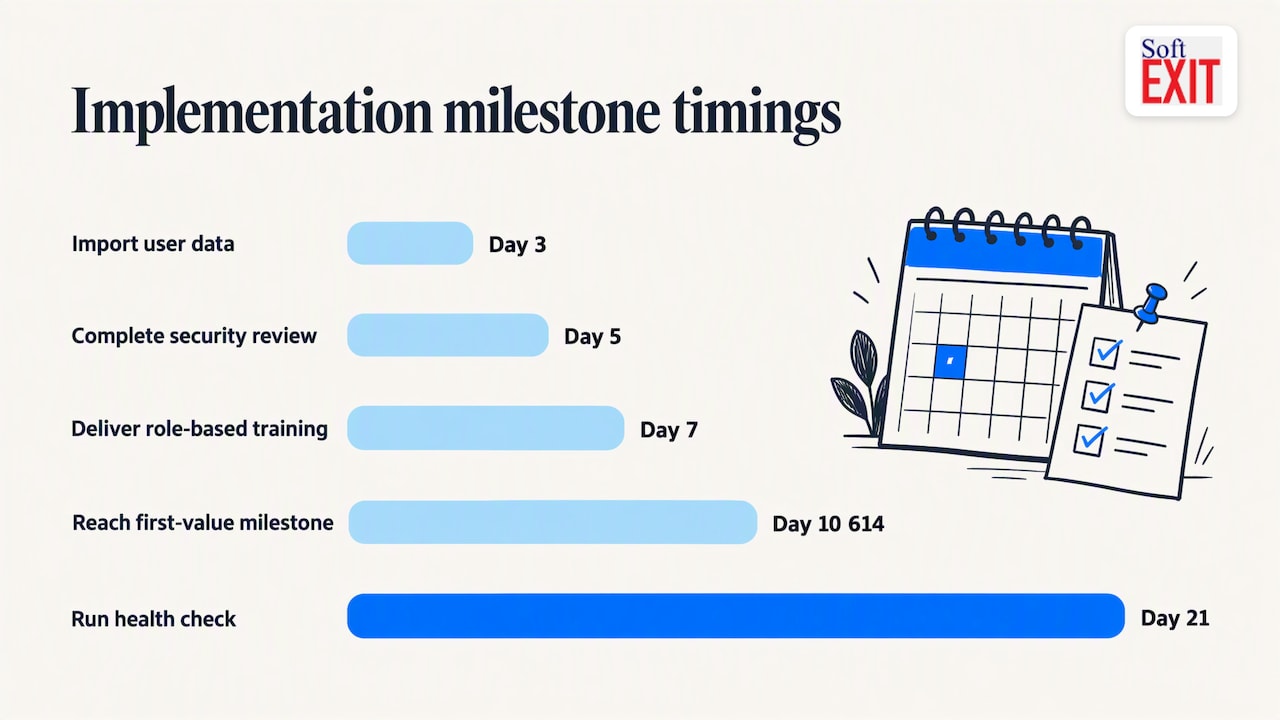
| Task | Owner | Due |
|---|---|---|
| Collect intake form | Customer | Before kickoff |
| Confirm success criteria | Onboarding manager | Kickoff day |
| Import user data | Implementation specialist | Day 3 |
| Complete security review | Technical specialist | Day 5 |
| Deliver role-based training | Onboarding manager | Day 7 |
| Reach first-value milestone | Customer | Day 10-14 |
| Run health check | Customer success | Day 21 |
Segmentation and conditional paths: how to route customers by need
Not every customer needs the same level of attention, and treating them identically wastes effort on simple accounts while under-serving complex ones. Three criteria decide which path a customer should take: contract value, number and complexity of required integrations, and security or compliance requirements.
- Contract value below a set threshold usually fits a self-serve or low-touch path with minimal human intervention.
- Integration complexity, such as multiple data sources or custom API work, pushes an account toward a high-touch or enterprise path regardless of contract size.
- Security and compliance requirements, like a formal review cycle, automatically route an account to a path with a technical specialist involved before training.
- Required time to success, when a customer has a hard external deadline, can justify a higher-touch path even on a smaller contract.
Conditional branching is simplest to automate using your CRM or workflow platform: if contract value exceeds a threshold, assign a dedicated onboarding manager; if an integration flag is set during intake, auto-create a technical review task; if a customer completes self-serve steps unusually fast, skip the scheduled check-in and move straight to expansion outreach.
Pro Tip: Build the routing logic once into your intake form, not into a human’s judgment call at kickoff. That keeps SLAs consistent and removes the manual triage step that slows everything down.
Metrics, monitoring, and automation to keep onboarding healthy
The four core metrics from earlier, activation rate, time to first value, completion rate, and onboarding churn, need instrumentation built into the product or the workflow tool itself, not a manual spreadsheet someone updates weekly.
- Activation rate is tracked by flagging the specific in-product action that defines activation and reporting the percentage of new accounts that complete it within a set window.
- Time to first value is tracked by timestamping contract signature and timestamping the first-value action, then reporting the gap in days.
- Completion rate is tracked by instrumenting each workflow step and reporting what percentage of accounts reach the final step.
- Onboarding churn is tracked by flagging any cancellation that happens before the first-value milestone is reached.
A documented sales-to-onboarding handoff, with named owner and required CRM fields, directly reduces the information loss practitioner guides identify as the top cause of onboarding breakdowns. That single process change is worth automating before any other.
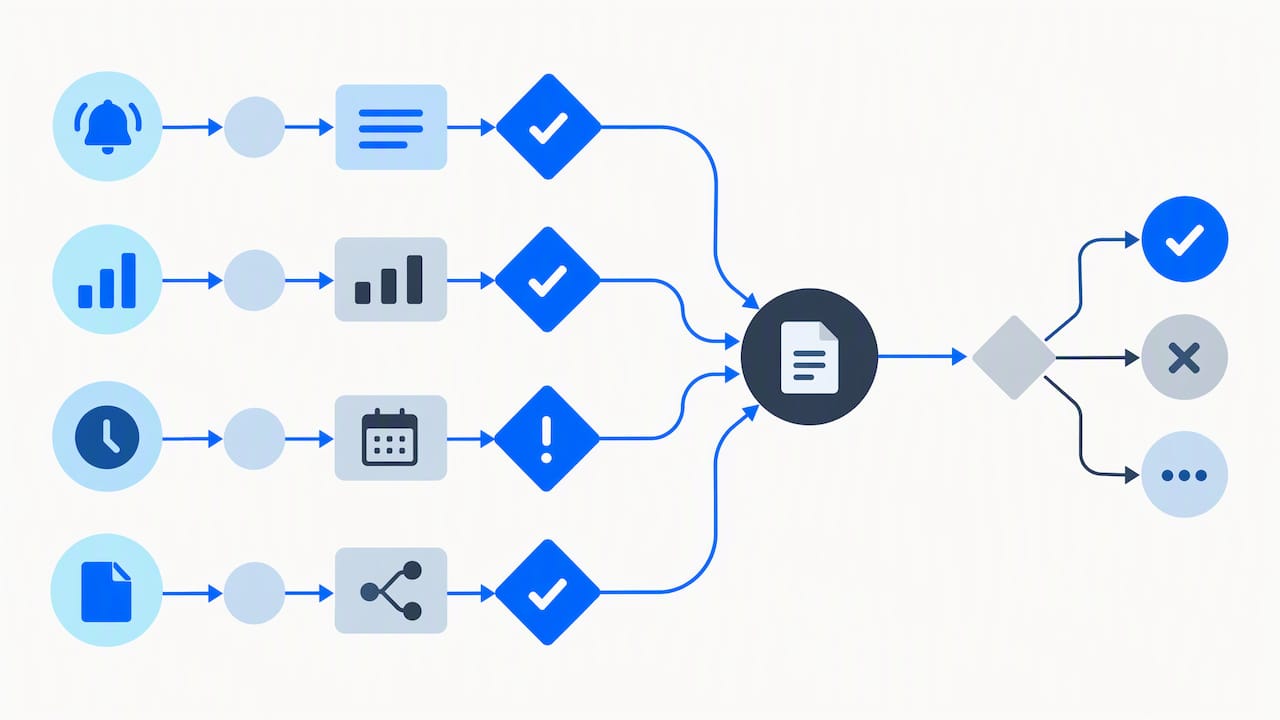
Automation handles the repetitive, time-sensitive parts well: reminder emails when a step stalls, automatic CRM field updates when a stage completes, escalation rules when a deadline passes unmet, and approval routing when a configuration change needs sign-off. Automation should not handle judgment calls, like deciding whether a confused customer needs a phone call instead of another email, or whether a missed deadline reflects a real problem versus a scheduling conflict. Keep a human in the loop at every exception point the workflow surfaces.
Sales-to-onboarding handoff: the single highest-risk moment
Practitioner guidance built into onboarding templates consistently identifies the handoff from sales to onboarding as the point where the most information gets lost, and where customer trust takes the first hit. The fix is not more communication, it is a required, structured record.
- Promises made during the sales cycle: specific features, timelines, or integrations the customer was told to expect.
- Success criteria: the outcome the customer defines as a win, in their own words where possible.
- Stakeholder map: every person involved in the decision and the rollout, with role and contact information.
- Deadlines: any external date the customer is working against, such as a renewal, a launch, or a compliance filing.
Store this record in the same CRM that drives the onboarding workflow, not in a separate document that the onboarding team has to go looking for. Make the four fields above required, not optional, on the deal record before it can move to onboarding status.
The operational rule that makes this stick: assign a named owner to every handoff record, and set a fixed SLA, such as 48 hours, for resolving any field left incomplete. Without an owner and a deadline, incomplete handoffs just sit unresolved until the customer notices the gap themselves.
Examples and mini-templates: three sketchable workflows
Three short pathways cover most of what practitioners build in practice.
- Self-serve SaaS. Signup triggers an automated welcome email with a single clear first task. The customer completes that task inside the product, often within minutes, and an in-app checklist tracks the remaining setup steps with no human involved unless the customer requests help.
- Low-touch SMB. An onboarding specialist runs one guided call to import existing data and configure core settings. The customer completes a short list of in-product tasks over the following week, with the goal of reaching first value within seven days and a single automated check-in at the end of that window.
- High-touch enterprise. A dedicated onboarding manager runs a formal kickoff, coordinates a security review and custom integration work, and schedules role-based training across multiple teams. The timeline runs several weeks, with a documented handoff from sales, phased rollout by department, and a formal milestone review before the account moves to steady-state customer success.
Each pathway shares the same underlying structure, intake, kickoff or equivalent, configuration, training, first value, and handoff, just compressed or expanded to match the complexity of the account.
How SoftEXIT Studio and SoftEXIT CRM can implement the workflows described
Every stage described above, intake forms, conditional routing, role-based training tasks, automated reminders, and the CRM-based handoff record, maps directly onto what we build with SoftEXIT Studio, our no-code application platform. Our AI-driven configuration helps you set up intake forms, workflow automations, and in-product checklists without writing code, so the templates in this guide can go from sketch to working workflow quickly.
A sensible starting pilot covers one onboarding path end to end, typically the low-touch or high-touch pattern, with intake form, kickoff task list, and handoff fields configured first. From there, conditional branching and the health-check automation extend naturally once the base workflow is running.
Lessons from building these workflows in practice
The mistake we see most often is teams chasing full automation before they have instrumented the one thing that matters: time to first value. If you cannot answer how long it takes a new customer to reach real value, no amount of automated reminders will fix the underlying problem. Automation should remove repetitive work, not the human judgment that handles exceptions, confused customers, missed deadlines, stakeholders who go quiet. Re-onboard when usage has genuinely lapsed or the account has changed hands; for everything short of that, ongoing enablement inside the product usually works better than restarting the whole process.
— James Edgell
Get your onboarding workflow running with SoftEXIT
We built SoftEXIT CRM so teams can configure the intake forms, kickoff checklists, conditional routing, and handoff fields described in this guide without hiring developers. Current pricing details are available on our plans page; either plan provides forms, workflows, and dashboards needed to run the templates above.
A focused 30-day pilot typically covers one onboarding path end to end: intake form, kickoff task list, conditional branching for one segment, and the handoff record inside your CRM.
- Start with our Starter plan if you are configuring a single onboarding path yourself.
- Bring in our professional services team if you want the pilot configured for you.
- Review the SoftEXIT CRM feature set to map it against your current onboarding steps.
Check plan details and pick the path that matches how much configuration help you need.
FAQ
What is the difference between customer onboarding and employee onboarding?
Customer onboarding moves a new customer from signed contract to confident product use, anchored on a first-value milestone, while employee onboarding moves a new hire from first day to full productivity within a team. Both use similar workflow mechanics, intake, structured stages, checklists, but the success criteria and stakeholders differ entirely.
How long should a customer onboarding workflow take?
There is no single correct length; it depends on contract complexity, with self-serve paths completing in minutes and enterprise paths running several weeks. The better question to track is time to first value, the gap between signup and the specific milestone that proves the product works for that customer.
What is the most common reason onboarding workflows fail?
Lost information at the sales-to-onboarding handoff is the most frequently cited failure point in practitioner guidance, where promises, success criteria, or stakeholder details never make it into the onboarding record. A required, documented handoff with a named owner addresses this directly.
Which metrics matter most for onboarding health?
Activation rate, time to first value, completion rate, and onboarding churn together give the clearest picture of whether a workflow is working. Tracking only one of these, such as completion rate alone, can hide a workflow that technically finishes but never gets customers to real value.
Can onboarding workflows be fully automated?
Repetitive tasks like reminders, CRM updates, and approval routing automate well, but exceptions, a confused customer or a stalled stakeholder, generally need a human to step in. Guidance on building onboarding templates recommends keeping conditional branches and an audit trail so a person can see exactly where automation should hand off to judgment.
Sources
- Customer Onboarding Process: Step by Step (Free Template)
- Optimizing Multi-Stakeholder User Onboarding (Wint case study) — Chalmers
- Customer Onboarding: Steps, Examples, and Best Practices