Best HubSpot Alternatives for Growing Teams in 2026

The best HubSpot alternatives depend on why you’re leaving. If it’s the price jump after the free tier, look at Zoho CRM or Bigin. If you want a simple deal pipeline, look at Pipedrive. If you need a CRM that bends to your process and can grow into other business apps, look at SoftEXIT. Below we compare five options on cost, fit and the fine print.
TL;DR
- HubSpot’s free CRM is solid. The pain usually starts when you need real automation and hit the jump to Professional pricing and onboarding fees.
- Zoho CRM and Bigin are the budget picks. Pipedrive is the pipeline-first pick. Salesforce is the heavyweight.
- SoftEXIT CRM starts at $14 per user per month and sits on a no-code platform, so you can add inventory, contracts or risk tracking later without a second vendor.
- Compare total cost of ownership (seats, onboarding, add-ons), not the sticker price.
- Run a small pilot before you migrate anything.
Why teams look past HubSpot
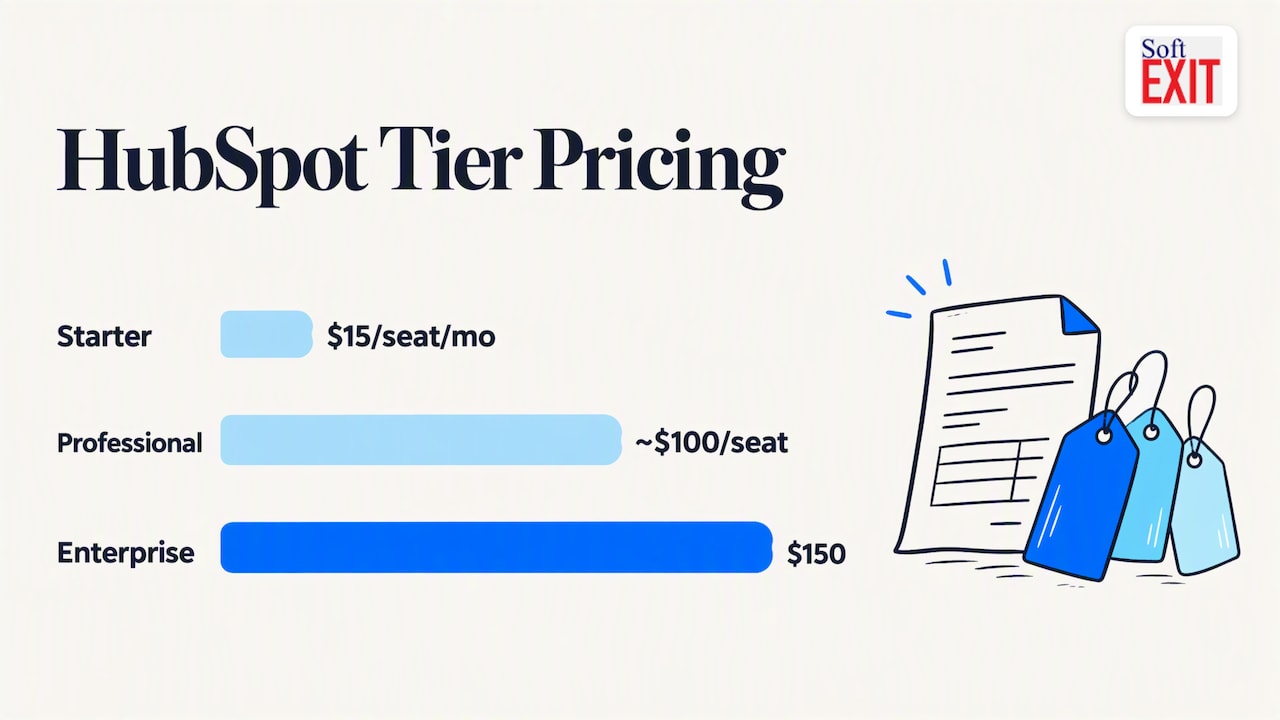
Most people don’t leave HubSpot because the software is bad. They leave because of the bill. Reviewers repeatedly point to a “tier gap”: you outgrow free or Starter, and the next step is a big one. According to a 2026 pricing breakdown, Sales Hub Starter is $15 per seat per month on annual billing, Professional is about $100 per seat plus onboarding, and Enterprise is $150. Check HubSpot’s live pricing page before you budget, because these numbers move.
Onboarding is the other surprise. One analysis of HubSpot alternatives puts mandatory onboarding fees on professional tiers at $3,000 to $7,000 or more, and flags usage-based charges for calling and SMS. That’s the stuff that never shows up on the pricing table.
Three other reasons come up a lot:
- Marketing automation is gated. Workflows, A/B testing and detailed reporting sit on paid tiers, which surprises people who assumed free meant full.
- Seat creep. Every new rep, assistant and manager adds a line item.
- Rigid structure. If your sales process doesn’t look like a standard B2B funnel, you end up bending your process to the tool.
The best HubSpot alternatives compared
Prices below are what we found published in October 2026. Vendors change them, so confirm before you sign.
| Tool | Best for | Starting price (per user/month) | Watch out for |
|---|---|---|---|
| SoftEXIT CRM | Teams that want a customizable CRM plus other business apps | $14 (Starter), $24 (Professional), Enterprise on request | Newer platform; you configure it to fit, which is the point |
| Zoho CRM | Budget-conscious SMBs | About $14 annual, $20 monthly | Feature depth varies by tier |
| Bigin by Zoho | Simple pipeline for small teams | $7 to $9 | Light on advanced features |
| Pipedrive | Sales-led teams that live in the pipeline | Varies by plan | Marketing tools are thinner |
| Salesforce | Large orgs with admins and budget | Varies by edition | Complexity and cost of ownership |
The Zoho figures come from a 2026 Zoho versus Pipedrive pricing guide, and Capterra’s CRM category page lists the Bigin range alongside user ratings. On Capterra, Salesforce Sales Cloud is tagged top rated, Zoho CRM great value and HubSpot top support.
SoftEXIT CRM
We’ll be upfront: this is our product. SoftEXIT CRM covers companies, contacts, opportunities, pipelines, activities, tasks and customer service. What sets it apart is that it’s built on SoftEXIT Studio™, a no-code platform. You can change forms, dashboards, workflows and reports to match how your team actually sells, and use AI-assisted configuration to get there faster. Role-based security and protected fields let you control who sees what.
The bigger payoff comes later. The same platform can run inventory management, contract tracking, risk management and other internal apps, so your CRM doesn’t become another silo. Pricing is per user: Starter is $14 per month, Professional is $24 per month, and Enterprise is quoted individually. See our plans for what each includes, or read the direct SoftEXIT CRM vs HubSpot comparison.
Zoho CRM and Bigin
Zoho is the usual first stop for cost-driven buyers. Standard runs around $14 per user per month on annual billing, and the Professional tier adds inventory management and process automation. Bigin is Zoho’s stripped-down pipeline tool, and it’s a sensible fit if you have five reps and one process. The tradeoff: once you want custom apps beyond sales, you’re stitching together more of the Zoho family.
Pipedrive
Pipedrive is built around the visual deal pipeline, and reps tend to like it for that reason. If your needs are “track deals, nudge follow-ups, forecast”, it does that cleanly. It’s lighter on marketing, so teams that relied on HubSpot for email and nurture often add another tool. We’ve written a side-by-side with SoftEXIT CRM vs Pipedrive Growth if you’re weighing the two.
Salesforce
Salesforce goes deepest, and it has the ecosystem to prove it. It also tends to need an admin, a partner or both. If you’re moving off HubSpot because of cost and complexity, jumping to Salesforce rarely solves either. If it’s on your list anyway, see our SoftEXIT CRM vs Salesforce page.
What to check before you switch
A sticker price tells you very little. Run each finalist through the same short checklist:
- Total cost of ownership. Add seats, onboarding, add-ons, and usage billing for calls and SMS. Per-seat creep and hidden fees are where “affordable” plans stop being affordable.
- Contact limits. HubSpot’s free CRM allows up to 1,000,000 contacts, so moving to a tool with tighter limits can sting.
- Marketing needs. If email automation is your main use of HubSpot, check whether the alternative does it or whether you need a second tool.
- Customization. Ask how a new field, a new pipeline or a new approval step gets built, and by whom.
- Data migration. Export contacts, companies, deals and notes first. Check what the new tool does with custom properties and history.
- Adoption. Research on CRM projects finds that change management is often deprioritized even though it predicts success. Plan training time, not just a cutover date.
Our perspective: the CRM is rarely the whole problem
We talk to a lot of teams who’ve outgrown a CRM. The pattern is almost always the same. The CRM handles contacts fine, then someone needs to track contracts, someone else needs a spreadsheet for inventory, and a third person builds a risk register in a shared drive. Six months later, the CRM is one of five disconnected places where customer facts live.
That’s why we built SoftEXIT CRM on a no-code platform rather than as a fixed product. We think a CRM should adapt to your process, not the reverse. When your team needs a new form or workflow, a business user should be able to build it, with AI-assisted configuration doing the heavy lifting.
We’re also cautious about AI. Research on AI in CRM describes “augmentation drift”, where people slowly stop checking AI output and the tool becomes de facto automation. Our view: keep a human in the loop on deal data, and make permissions and protected fields part of the setup from day one.
Our advice on switching is boring and it works: pilot first, pick one team, one pipeline, and a four to eight week window.
— James Edgell
A short story about spreadsheets
A sales manager we’ll call Dana once showed us her “CRM”: a spreadsheet with 14 tabs, three of them named “FINAL”, and one named “FINAL_v2_USE THIS”. A rep had sorted one column without the others, and for two weeks half the pipeline belonged to the wrong people. One prospect got three “nice to meet you” emails from three different reps. He replied to all three: “Is this a bot?” Dana laughed, then moved the whole thing into a real system the following Monday. The moral isn’t that spreadsheets are evil. It’s that once your data has a tab named “USE THIS”, it’s time to move the needle.
Where SoftEXIT fits in your shortlist
Pick SoftEXIT if you want a CRM that matches your process, you expect to need more than contacts and deals, and you prefer per-user pricing you can read in a minute. Start with the SoftEXIT CRM page, and watch the walkthrough to see the configuration in action. If you’d rather not build it yourself, our professional services team can handle implementation and configuration. For wider context, our guide on replacing legacy CRM with no-code options covers the migration side.
FAQ
Is HubSpot worth it?
For small teams on the free CRM, often yes. The value drops when you need marketing automation or advanced reporting, because those features sit on higher tiers with higher seat prices and, per some reviewers, onboarding fees. Price out your real two-year setup before deciding.
What is the cheapest HubSpot replacement?
Bigin by Zoho is among the lowest-cost paid options, at roughly $7 to $9 per user per month according to Capterra-based research. SoftEXIT Starter is $14 per user per month, and Zoho CRM’s entry plan is in a similar range.
Can I move from HubSpot without losing data?
Usually, yes. Export contacts, companies, deals and activities as CSV files, then map your custom properties to fields in the new system. Test the import with a small batch before you move everything.
Do I need a developer to customize a HubSpot alternative?
Not with a no-code platform. With SoftEXIT, business users build forms, dashboards and workflows themselves, and professional services are available if you want help.
Sources
- HubSpot Sales Hub Pricing 2026 (Sybill)
- Best CRM Software 2026 (Capterra)
- HubSpot Alternatives 2026 (Real Cost Labs)
- HubSpot Review 2026 (ICON)
- HubSpot vs Mailchimp (Zapier)
- Change Management and Generative AI in CRM Projects (University of Turku)