AI App Builders for Business Teams: Prototype to Production

Most business teams should pick an AI-augmented no-code or low-code platform that offers governance, backend depth and room to grow, and we recommend SoftEXIT for teams that need CRM plus extensible business apps. Gartner’s market analysis points the same direction: speed alone doesn’t carry an app into production, governance and integration do.
TL;DR:
- For teams handling customer records, contracts, or personal data, prioritize role based access, audit logs, encryption, and data residency answers before choosing a builder.
- During trials, test two user roles, confirm records persist after restarting, schedule a recurring job, and verify that app or data export works.
- For a team of two with a deadline in two weeks and no sensitive data, prototyping tools may fit; larger teams should favor governed platforms.
- Public Android releases require security and policy checks; Google blocked 1.75 million apps that violated Google Play policies in 2025.
- Plan one to four weeks for persistent storage and authentication, then one to two weeks for quality and security checks before deployment.
Which type of AI app builder fits your goal?
Skip the vendor-by-vendor chase. Start with what you’re building, then pick the category. Here are the categories we’d consider, each with a “best for” and the catch.
- Enterprise no-code/AI platforms: best for governed, extensible business apps like CRM, contracts and operations. Trade-off: more setup than a weekend prototype tool.
- Low-code AI platforms: best when you want speed but your developers still want hooks for custom code. Trade-off: you need someone who can read code.
- No-code form and app builders: best for forms, intake and simple workflows. Trade-off: they run out of road once logic and data relationships get complicated.
- Vibe-coding and rapid prototyping tools: best for validating an idea in an afternoon. Trade-off: databases, authentication and hosting usually come later and take real work.
- Mobile-first AI app makers: best when you want a native preview and have store ambitions. Trade-off: store review and security checks are on you.
- Managed and professional services: best when you want a turnkey result and don’t have builder time. Trade-off: less hands-on learning for your team.
Quick decision guidance: a team of two with a two-week deadline and nothing sensitive can lean toward prototyping tools. A team of twenty with customer data and an audit coming should lean toward the first two categories. If the app touches money, contracts or personal records, governance moves to the top of your list. If you expect a larger user base or a frequent workflow, pick backend depth over demo polish.
How should you evaluate an AI app builder?
We judge every builder on the same handful of dimensions, and you should too. They’re the ones that separate a nice demo from something your team can depend on over time.
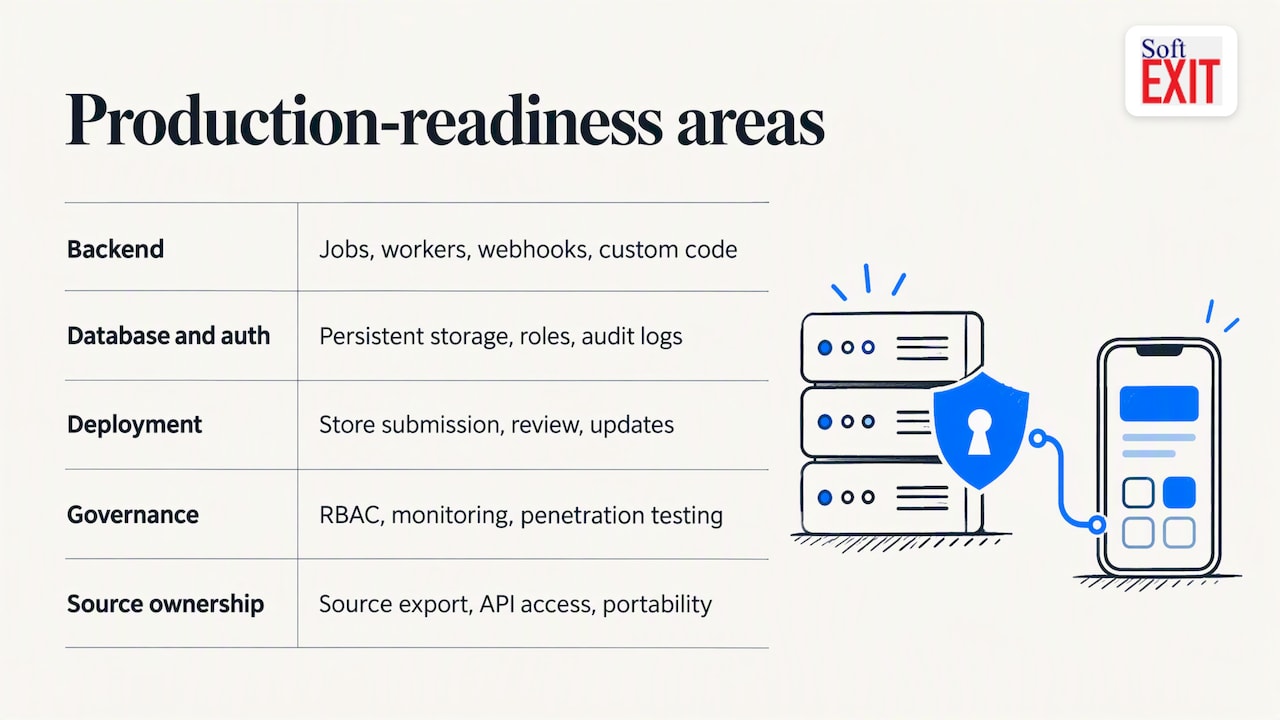
- Backend depth. Can it run scheduled jobs, webhooks and background tasks, or only render screens?
- Database and auth support. Is data stored persistently, with real roles and permissions?
- Deployment. Web only, native packaging, or store publishing? What does each cost in effort?
- Pricing transparency. Is the price per user, per app or per transaction, and are connectors extra?
- Source-code ownership. Can you export your app, data and logic if you leave?
- Where it breaks down. Every tool has a ceiling. Find it before you build on it.
You don’t need a lab to test these. Run a few small checks during any trial:
- Build a simple login flow with two roles and confirm one role can’t see the other’s records.
- Enter data, close the app, come back tomorrow, and check that it persisted.
- Try to export the app or at least all of its data.
- Schedule one recurring job, like a daily reminder, and see whether it actually fires.
If a tool fails any of these, you’ve learned something a landing page never tells you.
Pro Tip: Ask the vendor, “Show me an audit log and how I’d export everything tomorrow.” A real platform should be able to show you. A weak one changes the subject.
What separates a prototype from an app that scales?
This is where most comparisons go shallow, so let’s go deeper on the capabilities that decide whether a builder survives contact with real users.
Backend depth means real server-side logic: scheduled jobs, background workers, webhooks and a way to add custom code when the visual tools aren’t enough. Replit’s CEO has described the shift to non-technical builders as a long evolution, and noted that vibe-coding delivers quick results while teams often need backend reliability, database management and authentication later. TechCrunch’s reporting on Replit and Bolt.new makes a similar point: these tools shine at rapid iteration, but moving to production needs persistence, auth and hosting work.
Database and auth is more than “it saves stuff.” Look for persistent storage, role-based access control, audit logs, encryption and some answer on where your data lives. If your customers ask about data residency, you want an answer ready.
Deployment and store readiness matters if you’re shipping to phones. Google’s AI Studio now lets people create native Android apps, with setup and coding time cut to minutes. Lovable has launched a mobile app of its own that lets people build with voice or text and publish web apps. Wix introduced an AI feature for native iOS and Android apps tied to its Branded App plan at $99 per month. Fast previews are great. Store submission, review and updates are separate chores, so ask what the tool handles and what it doesn’t.
Governance and security is the quiet deal-breaker. RBAC, audit logs, monitoring and readiness for penetration testing are often the blocker for enterprise adoption of AI-built apps, and mature low-code platforms tend to have them where generative-first tools don’t. Gartner’s governance best practices for Power Apps and Power Automate are a useful checklist even if you never touch Microsoft’s tools. Its research also frames AI-augmented low-code as a launchpad for complex workflows, where the value lies in governing and scaling AI agents.
Source-code ownership and portability is your exit plan. Can you export source, reach everything through an API, and walk away without rebuilding from zero? Lock-in signals include proprietary formats with no export, and “contact sales” for data extraction.
Pricing and total cost deserves a hard look. Compare subscription, per-user and transaction models, then hunt for the extras: premium connectors, professional services, extra environments. A cheap seat price can hide an expensive project.
Here’s how it all lines up by category:
Public distribution is a different job than private use. TechCrunch reported that Google blocked 1.75 million policy-violating apps from Google Play in 2025, a reminder that going beyond personal or internal use means real security and compliance work.
Google Play has since made room for private, vibe-coded apps that run on Android without a public listing, though they still have to follow Play policies. Private tools are easy now. Public products are still a grown-up project.
When should you pick each category?
Turn the capabilities into decisions. Walk through these checkpoints before you shortlist anything:
- Audience: internal staff, or the public? Internal tools forgive rough edges. Public ones don’t.
- Scale: a small user base or a large one? Backend depth matters more as the number grows.
- Data sensitivity: customer records, contracts or health details call for roles, audit logs and encryption from day one.
- Integrations: if the app has to talk to your CRM, billing or email, check connectors and API access early.
- Team skill: no developers on staff means favor no-code with strong support. A developer on the team opens up low-code.
- Budget: count the whole bill, including setup help.
Now match scenarios to categories:
- Internal micro apps (a request tracker, a checklist): no-code form builders or vibe-coding tools. Must-haves: simple roles and an export button.
- Rapid consumer MVPs: vibe-coding or mobile-first makers. Must-haves: a plan for authentication and a path to real hosting.
- Revenue-generating mobile apps: mobile-first makers or low-code AI platforms. Must-haves: store submission support, analytics and update handling.
- Enterprise workflows: enterprise no-code/AI or low-code platforms. Must-haves: RBAC, audit logs, integrations and exportability.
If you need CRM and the ability to build business apps around it, we’d choose an AI-driven no-code app platform with role-based security, and that’s why we built SoftEXIT Studio and SoftEXIT CRM. Our AI-in-CRM approach configures AI inside CRM workflows, and our Studio plus CRM combination maps directly to the dimensions above: governance and room to extend. If you’re weighing us against broader enterprise platforms, we’ve put together a Power Apps comparison so you can check the dimensions yourself.
How do you move from prototype to production?
Here’s a practical path. Your mileage will vary, but the order rarely does.
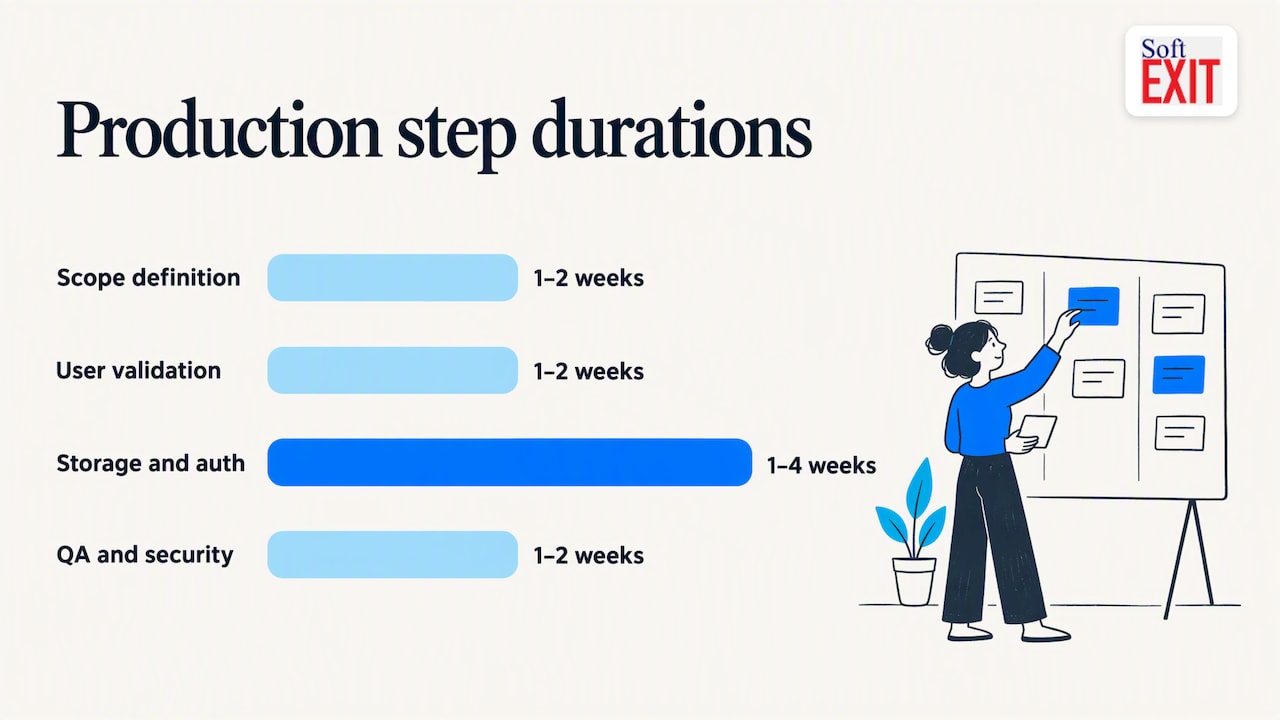
- Define scope (1–2 weeks). Write down who uses the app, what data it holds and what “done” means. Cut anything that isn’t day-one critical.
- Prototype in an AI builder. Build the ugliest working version you can. Don’t polish.
- Validate with users (1–2 weeks). Put it in front of real users. Watch where they get stuck.
- Add persistent storage and auth (1–4 weeks). Design the data model, set up roles and permissions, and turn on audit logs.
- QA and security checks (1–2 weeks). Run integration tests, review data privacy and, if the stakes are high, arrange appropriate security testing.
- Deploy and monitor (ongoing). Set up CI/CD where your platform supports it, add analytics and alerting, and prepare app-store submission if you’re shipping to phones.
A few details per step are worth knowing. In step 4, building a business database you can trust is mostly about naming things consistently and deciding who can edit what before the first record goes in. In step 5, test your integrations with messy data, because clean demo data hides most bugs.
Common pitfalls and how to dodge them:
- Prompt leakage: sensitive details pasted into prompts can travel further than you intended. Keep real customer data out of prompts and use test records.
- Ephemeral test data: a prototype that quietly resets itself is charming until demo day. Confirm persistence early, using the restart test from our evaluation list.
- Missing export paths: if you can’t get your data out, you don’t own your app. Test the export in week one, not year two.
- Hidden connector costs: premium connectors and extra environments can make a bill much more expensive. Ask for the full price list before you commit.
If your team is stretched, this is where vendor features or professional services earn their keep. We offer implementation and configuration help for teams that would rather ship than study.
Pro Tip: Automate your governance. Set staging data to auto-delete on a schedule and keep production and test environments separate. It’s far easier to enforce a rule the system applies than one people have to remember.
What we’ve learned from watching teams use AI builders
Here’s our honest take. The tools aren’t the problem anymore. Anyone can get a working prototype in an afternoon. The blocker is nearly always governance: who can see what, who approved this, where the data lives and what happens when the person who built it leaves. The teams that do well embed AI inside a platform that already handles operations and security, instead of bolting security onto a clever demo later.
One quick story. A team we know asked an AI builder for a simple office lunch-order tracker. The prototype worked beautifully, right up until someone noticed it had helpfully added a “most likely to order pizza” leaderboard with names attached. Nobody asked for it, everyone loved it, and one very competitive coworker started ordering pizza to climb the ranks. The team had a good laugh. Then they realized the app had invented a feature, stored personal habits nobody had agreed to share, and had no way to turn it off. They kept the lunch tracker, deleted the leaderboard and added a review step before anything shipped.
The takeaway is plain. Start small, plan for exportability from day one, and choose a platform that can grow with you instead of one you may outgrow quickly.
— James Edgell
Why we recommend SoftEXIT for business-ready apps
We built SoftEXIT Studio around the dimensions in this guide. AI-driven configuration helps you create databases, forms, dashboards, reports and workflows without writing code. Role-based security and protected fields keep sensitive data in the right hands. Interactive dashboards and reusable application components speed up future apps. And because SoftEXIT CRM runs on the same platform, you can start with customer relationships and expand into inventory, risk management, contract tracking and other operational apps without switching tools.
We’re a fit for small and midsize businesses and teams that want CRM today and the freedom to build the apps they’ll need tomorrow. Plans are Starter at $14 per month per user and Professional at $24 per month per user; current Enterprise pricing is on our plans page.
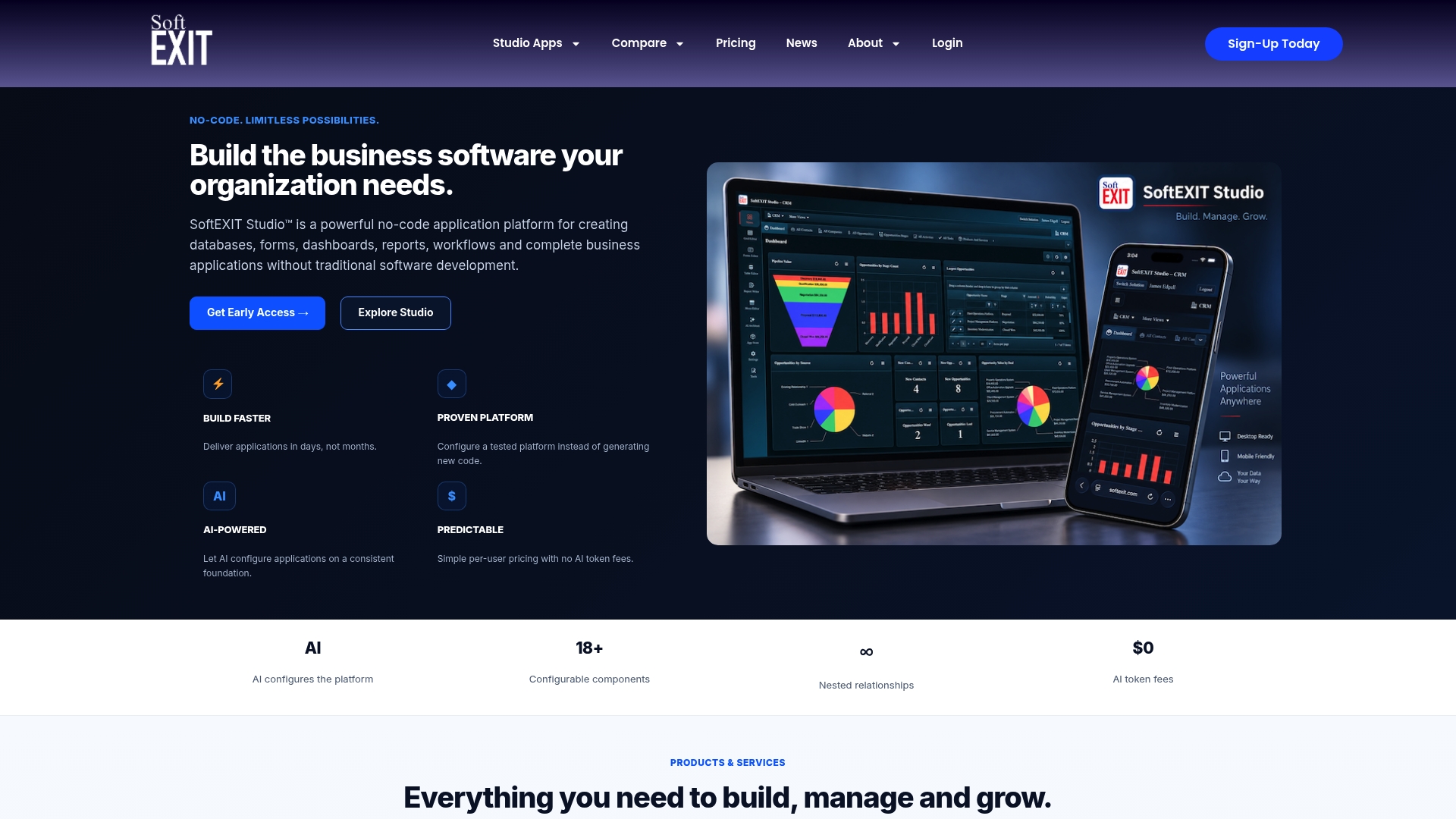
If you’d like help getting from idea to a working, governed app, our Professional Services team handles implementation and configuration. Start with SoftEXIT CRM or look at the plans, and let’s get your first app live.
FAQ
What is the best AI app builder for business teams?
For most business teams, an AI-augmented no-code or low-code platform with strong governance and backend depth is the safest bet. We recommend SoftEXIT for teams that need CRM plus extensible business apps. Prototype-first tools suit quick experiments better than production use.
What is the best app to build AI agents?
It depends on whether the agents need governance. Gartner research describes AI-augmented low-code platforms as a launchpad for complex workflows, where the value is in governing and scaling agents. Generative-only tools often lack that layer.
Can non-developers build apps with AI builders?
Yes. TechCrunch reports that non-developers are writing “micro” apps in plain language, with development shrinking from weeks to minutes. These work best for personal or internal team use, since public release needs more security and store compliance.
Which AI is better than ChatGPT for building apps?
“Better” depends on the job, and a chatbot isn’t an app platform. For building apps, look at builders that give you persistent data, roles and exportability. Test any candidate with the trial checks above.