Best Contact Management Software for Businesses in 2026

The best contact management software is the one that keeps every customer, lead, partner, and vendor record accurate and searchable, then connects those records to deals and follow-ups your team will actually use. For most small and midsize US businesses, that means a lightweight CRM with customizable fields rather than a bare address book. Below we compare ten commonly shortlisted tools, show real entry prices where published, and explain how to choose.
Key takeaways
- Contact management stores and organizes work contacts. A CRM adds email integration, lead management, workflow automation, and deeper reporting.
- Match the tool to your process: contact-to-company links, deal stages, a visual pipeline, permissions, and exportable data matter more than a long feature list.
- Entry prices vary widely. Zoho CRM lists $14 per user/month billed annually, and Freshsales lists $9 for its Growth plan.
- SoftEXIT Studio includes a free CRM and other business apps with a membership starting at $14 per user/month, billed annually, and you can customize them without code.
- Pilot any shortlist with real data and real users before you commit.
Contact management software vs. a contact database vs. a CRM
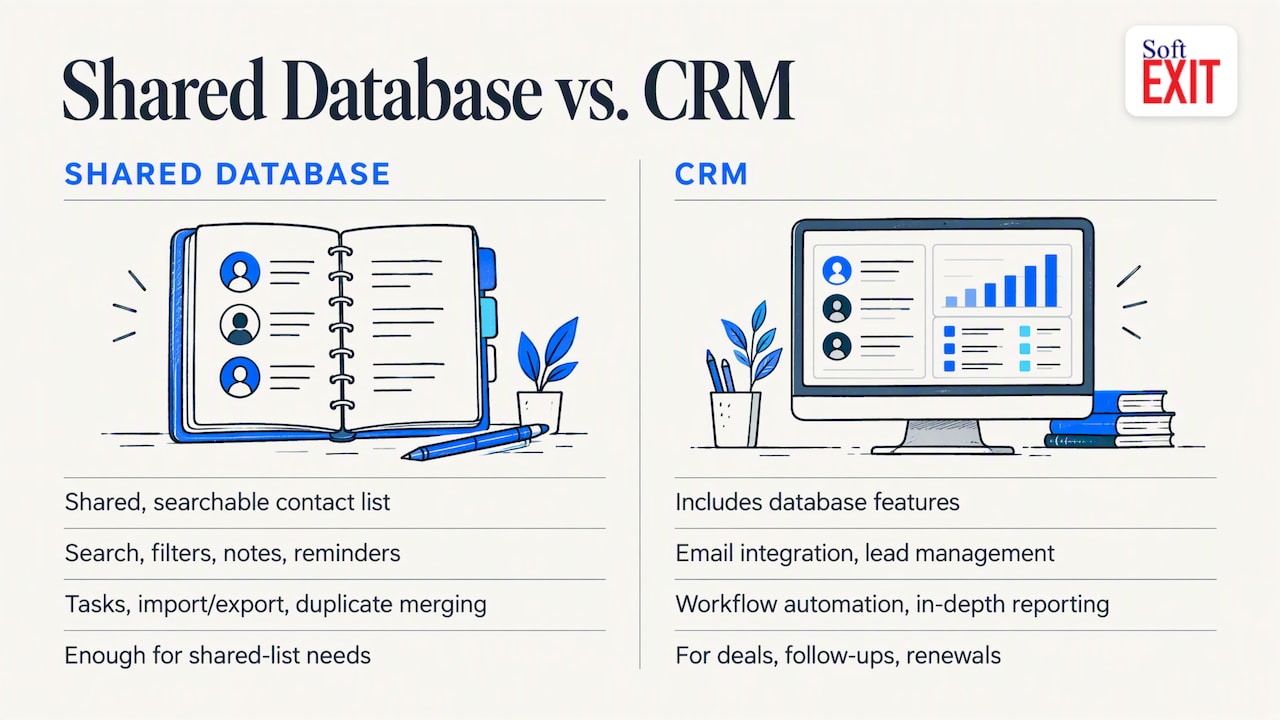
The three terms overlap, and vendors use them loosely. Zapier defines contact management as storing, organizing, and securing work-contact information, such as colleagues, clients, leads, partners, and vendors, in one central place. Typical features are search and filtering, notes and reminders, tasks, import and export, and duplicate merging.
A CRM includes all of that and adds email integration, lead management, workflow automation, and in-depth reporting, according to the same guide. Forbes Advisor frames CRM as the broader process from lead generation through conversion and post-sale relationships.
A practical rule: if you only need a searchable, shared list, a contact database is enough. If anyone on your team tracks deals, follow-ups, or renewals against those contacts, you want CRM-level contact management.
What to look for in business contact management software
Use this checklist when you compare tools. It draws on guidance from CRM.org and Forbes Advisor.
- Clean records. Searchable contact and company records, deduplication, and bulk editing.
- Relationships. Contacts linked to companies and deals, with a full interaction history.
- Customization. Fields and workflow actions you can change without a developer.
- Pipeline. Opportunity stages and a visual board that shows movement toward closing.
- Follow-up. Tasks, reminders, and automated status updates.
- Reporting. Dashboards and reports you can create, filter, save, and share without IT help.
- Integrations. Email, calendar, marketing, and billing tools.
- Control. Role-based permissions and the ability to export your data.
Automation is where the time savings show up. One example of what a pipeline workflow can look like in practice is this set of roofing CRM automations, which shows lead routing and follow-up triggers that apply to any field-sales team.
Best contact management software compared
CRM.org’s comparison of contact management software lists the tools below, and we add SoftEXIT as an eleventh entrant. Prices are those published by the sources cited and can change, so confirm them on each vendor’s page.
| Tool | Best for | Published entry pricing |
|---|---|---|
| SoftEXIT CRM | Customizable CRM and business apps on one membership | Free with Studio membership from $14 per user/month, billed annually |
| HubSpot CRM | All-in-one contact and sales tracking | Check HubSpot’s pricing page |
| Airtable | Spreadsheet-friendly, no-code layouts | Check Airtable’s pricing page |
| Bigin by Zoho CRM | Small-team CRM | Check Zoho’s pricing page |
| Zoho CRM | Growing sales teams | Free for up to three users; Standard $14 per user/month billed annually |
| Freshsales | AI-assisted sales automation | Free for three users; Growth $9, Pro $39, Enterprise $59 per user/month billed annually |
| Zendesk Sell | Pipeline reporting and email automation | Team $19, Growth $55, Professional $115 per user/month billed annually |
| monday CRM | Visual workflows | Check monday.com’s pricing page |
| Copper | Google Workspace users | Check Copper’s pricing page |
| Pipedrive | Sales-focused pipelines | Check Pipedrive’s pricing page |
| Less Annoying CRM | Easy setup | Check the vendor’s pricing page |
The price rows come from Forbes Advisor’s Zoho CRM pricing guide and Shopify’s pipeline tools roundup. Zoho’s free edition covers lead, contact, and account management, standard reports, and workflow automation. Its Standard plan adds multiple pipelines, mass email, custom dashboards, and sales forecasting. Shopify lists a 14-day trial for Zendesk Sell and a 21-day trial of paid plans for Freshsales.
How the options differ
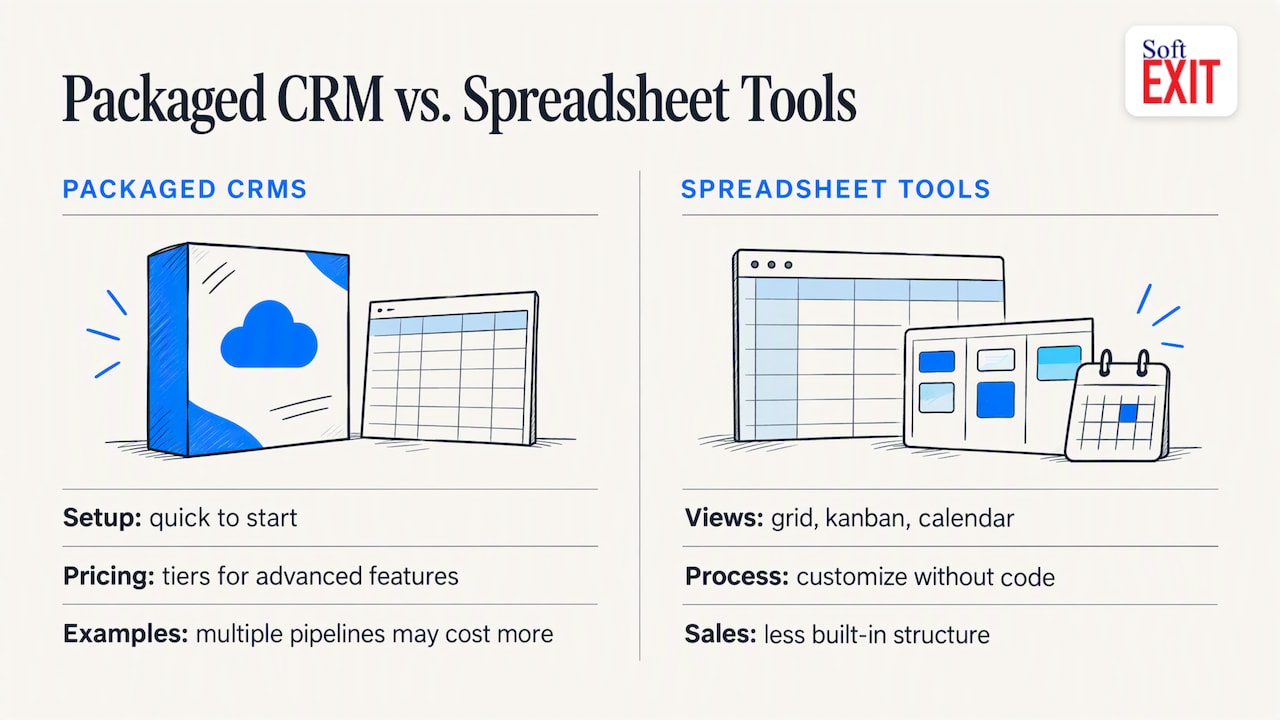
HubSpot CRM is the name most reviewers reach for first when you want all-in-one contact and sales tracking. Airtable is the clearest spreadsheet-style option: CRM.org describes flexible grid, kanban, and calendar views you can customize without code. Bigin and Less Annoying CRM target small teams that want fast setup. Copper suits teams living in Google Workspace. Pipedrive is built around a visual sales pipeline, a point Shopify also makes. Contacts+ and Nimble lean toward contact syncing and social and email capture, which suits individual networkers more than shared sales teams.
The trade-off is usually the same. Packaged CRMs are quick to start but charge by tier for features such as custom dashboards or multiple pipelines. Spreadsheet-style tools bend to any process but give you less out-of-the-box sales structure.
Where SoftEXIT fits
SoftEXIT CRM sits between those two camps. It manages customers, companies, contacts, opportunities, pipelines, and activities, and it runs on SoftEXIT Studio, a no-code platform. That means you can add fields, create related tables, build dashboards, and generate reports without a developer. Your contact data can also live beside other apps built on the same platform, such as Contract Manager for renewal and cancellation-notice tracking.
The pricing model is the main difference. The CRM is free with a SoftEXIT Studio membership, and membership starts at $14 per user/month when billed annually. Eligible apps carry no additional per-app subscription. The Starter plan is $14 and the Professional plan is $24 per user/month, and there is a 21-day free trial.
If you are weighing it against a specific competitor, we publish a side-by-side of SoftEXIT CRM vs Pipedrive Growth. For a wider buyer’s view, see our guide to the best CRM for small business.
Our perspective on choosing a contact manager
Most businesses we talk to do not outgrow their contact tool because it lacks a feature on day one. They outgrow it because their process changes and the software cannot. A new field, a related table for locations or contracts, a dashboard for a particular manager: each becomes a ticket, an upgrade, or another subscription.
That is why we built SoftEXIT Studio the way we did. Every application, CRM included, runs on one customizable platform, and the AI Architect configures that proven platform from a plain-language description instead of generating custom code. You pay one membership rather than a subscription for each app, and there are no additional AI token fees. Our advice: choose the tool whose structure you can change yourself, then pilot it with your own data before you decide.
— James Edgell
How to replace spreadsheets without losing data
CRM.org’s guidance on choosing a CRM translates into a short plan.
- Map your process and data. List the fields you track today and the stages a contact goes through.
- Set goals and constraints. Decide your budget, user count, and must-have integrations.
- Prioritize must-haves. Separate what you need now from what is nice to have.
- Pilot with real data and users. Test search, filtering, bulk editing, automation, dashboards, permissions, and export.
- Check portability and total cost. Confirm you can export everything, and count admin effort and migration time alongside the subscription.
A kanban view is an easy first win during the pilot. Our guide to building a kanban sales pipeline shows how many columns to start with.
Try SoftEXIT free for 21 days
If you want contact management that grows into a full set of business apps, start with SoftEXIT Studio. Membership starts at $14 per user/month billed annually, and the CRM and other eligible apps are included at no extra per-app cost. Import a sample of your contacts, build your pipeline, and see whether it fits your process.
Start your 21-day free trial or, if you want help configuring it, look at our professional services.
FAQ
What is the difference between contact management software and a CRM?
Contact management software stores and organizes contact details, notes, tasks, and reminders. A CRM includes that and adds email integration, lead management, workflow automation, and reporting. If your team tracks deals or renewals against contacts, a CRM is the better fit.
Is there free contact management software?
Yes. Zoho CRM and Freshsales both list free editions for up to three users, according to the sources above. SoftEXIT CRM is included at no extra per-app cost with a Studio membership starting at $14 per user/month, billed annually.
Can I use a spreadsheet instead?
A spreadsheet works for a handful of contacts and one user. It struggles with duplicates, permissions, interaction history, and pipeline views. Once several people edit the same list, move to a tool with linked records and role-based access.
How should I test a contact manager before buying?
Pilot it with real data and real users. Test search, filtering, bulk editing, automation, dashboards, permissions, and export, as CRM.org recommends. A trial that includes your own import is more telling than a demo.
Sources
- 10 Best Contact Management Software for 2026 | CRM.org
- How to Choose a CRM: 10 Expert Tips | CRM.org
- A quick guide to contact management | Zapier
- 14 Essential CRM Features | Forbes Advisor
- Zoho CRM Pricing Guide | Forbes Advisor
- Pipeline Management Tools: 10 Best Sales Software | Shopify