Vendor Management CRM: Options Compared for US Teams

A vendor management CRM is a system where you keep vendor records, contracts, onboarding steps and performance notes in one place instead of scattered spreadsheets and inboxes. For most small and midsize US businesses, the practical choice is between a dedicated vendor management or procurement suite and a customizable no-code platform. SoftEXIT Studio is the second kind: apps are free with a SoftEXIT Studio membership starting at $14/user/month when billed annually.
Key Takeaways
- A vendor management system covers the full vendor lifecycle: onboarding, contracts, performance and compliance. A standard CRM is built around customers.
- Enterprise suites such as Coupa and Gatekeeper tend to be quote-based. Smaller tools publish entry prices, for example Rippling Procurement at $8 per employee per month.
- A no-code platform suits teams whose vendor process is specific to them and who want to shape records, forms and dashboards themselves.
- A good onboarding workflow collects data from the vendor, routes approvals by risk or spend, and leaves an audit trail.
- Pilot with one real process, such as new-vendor intake, before you commit.
What vendor management CRM software actually does
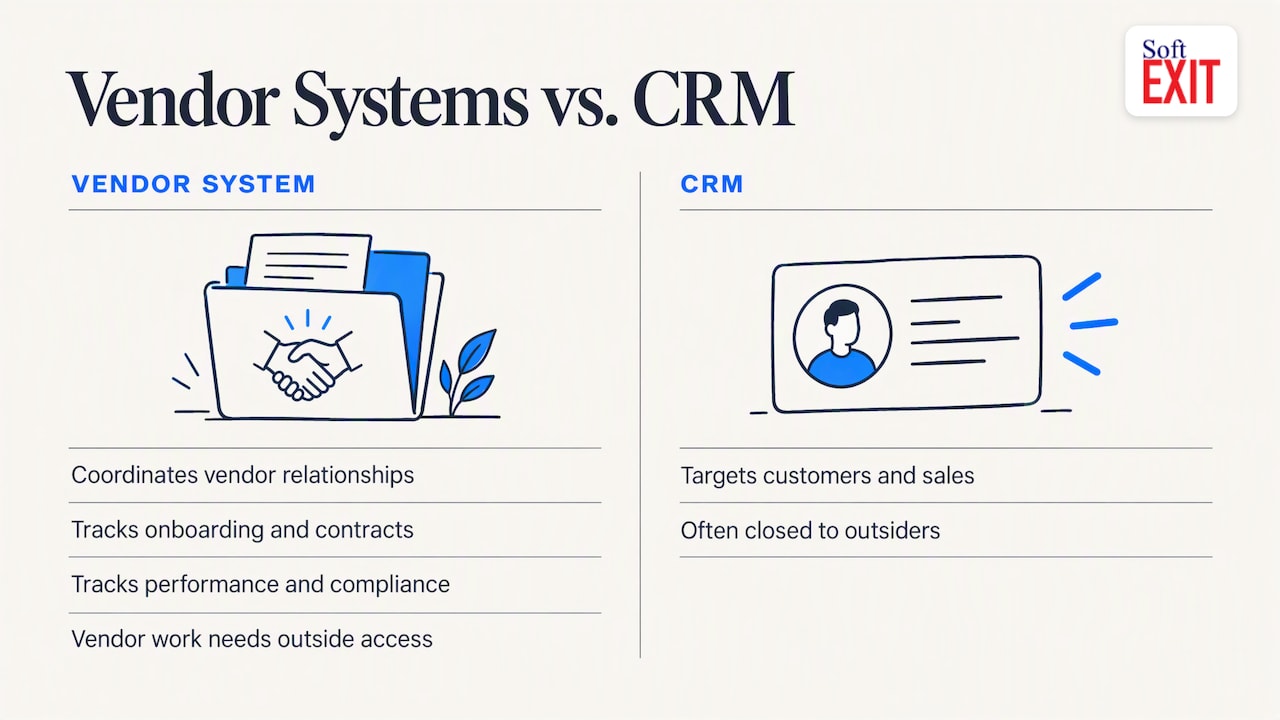
The phrase blends two categories. A vendor management system is a platform that helps organizations coordinate vendor relationships, oversee them across the lifecycle and track onboarding, contracts, performance and compliance. A CRM, by contrast, is aimed at customers and sales engagement.
The gap matters in practice. One Forbes Tech Council piece argues that standard CRMs often handle vendors poorly because they are closed systems built for internal stakeholders, while vendor relationships need access for outside parties. So the question to ask of any option is not “is it a CRM?” but “can it model vendors, contracts, documents and approvals the way we work?”
That is why customizable platforms appeal to teams with unusual requirements. If a CRM lets you add fields, related tables, forms and role-based access, it can be shaped into a vendor register.
How a vendor onboarding workflow works
A workable onboarding flow has the same bones in nearly every tool:
- Intake. The vendor submits company details, tax and banking information, insurance and certifications through a form, rather than by email attachment.
- Validation. The system checks for missing or inconsistent fields before a person sees the request.
- Routing. Approvals go to the right reviewer. Automation can route by vendor type, spend threshold or risk level, and connect to ERP, procurement or AP systems.
- Contract and renewal tracking. Start dates, expiry dates and cancellation notice windows are logged so renewals do not slip by.
- Ongoing review. Performance notes and document expiry reminders keep the record current.
The payoff is less chasing. Automation takes over repetitive work such as emailing PDFs and chasing missing signatures, and it can leave an audit trail. If you are planning the rollout, a 90-day approach to AI SaaS integration is one way to think about sequencing automation without overloading the team.
Vendor management options compared
| Option | Type | Pricing signal | Best fit |
|---|---|---|---|
| SoftEXIT Studio | No-code platform with CRM, Contract Manager and AI-built custom apps | Starter $14 per user/month billed annually; Professional $24 per user/month; 21-day free trial | SMBs that want to build their own vendor register, forms and dashboards |
| Gatekeeper | Vendor and contract management with a third-party risk suite | Pro, Enterprise and Enterprise Plus tiers based on third-party quotas | Compliance-driven teams |
| Coupa | Enterprise procurement suite | No published prices; negotiated on spend under management and modules | Large procurement departments |
| Rippling Procurement | Procurement module | From $8 per employee per month | Teams already using Rippling |
| Precoro | Procurement and spend control | Core plan from $499/month, billed annually | Purchasing-focused finance teams |
| Kissflow | Workflow platform | Free trial and plan-based pricing | Process-heavy teams |
Prices change, so confirm each on the provider’s own page before you budget.
Procurement suites versus a customizable platform
Procurement suites bring purchase orders, spend analytics and supplier risk scoring. They are strong when procurement is a department of its own. They also tend to come with sales conversations, setup time and a feature list you did not choose.
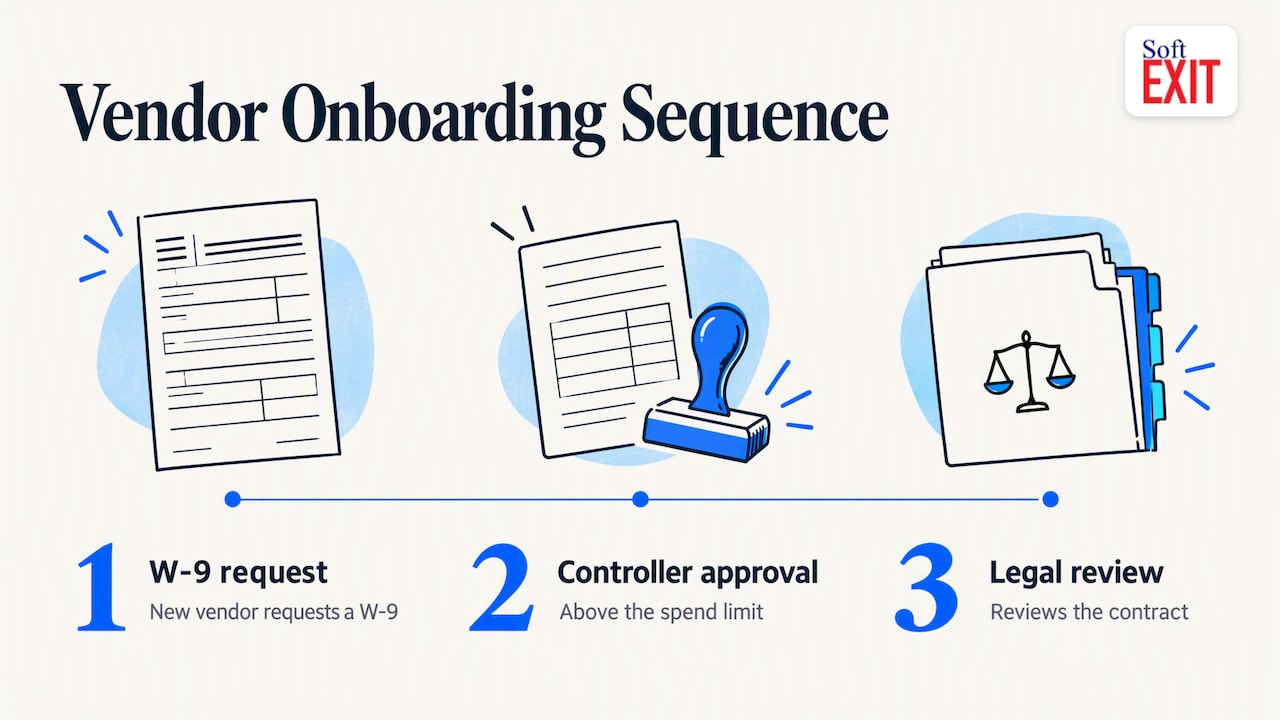
A no-code platform flips that. You start from your own process, such as “new vendor requests a W-9, our controller approves above a spend limit, legal reviews the contract”, and build only that. The tradeoff is that you design the model, so a short pilot is the right way in.
Where SoftEXIT Studio fits
SoftEXIT Studio is a no-code, AI-powered business application platform. Its concept is one membership and one price, with eligible applications included at no extra per-app subscription cost. That includes SoftEXIT CRM and a Contract Manager that tracks agreements, expiration and renewal dates, and cancellation notice deadlines, all things a vendor file needs.
Because every app runs on the same customizable platform, you can add fields, create related tables, build dashboards and generate reports. Our AI Architect lets you describe requirements in natural language and configures the platform accordingly, with role-based security and protected fields for sensitive data such as banking details. You can see how the CRM stacks up in our SoftEXIT CRM vs HubSpot comparison, and our intake form video shows the data-collection side of a workflow like onboarding.
For a vendor register, a typical build would be:
- A Vendors table with category, owner, status and risk tier.
- A related Contracts table with renewal and notice dates.
- A Documents or Certificates table with expiry dates.
- An onboarding intake form feeding the Vendors table.
- A dashboard of vendors by status and contracts renewing soon.
If you want help getting there, our Professional Services cover implementation and configuration.
How to choose: a checklist for replacing spreadsheets
- Vendor volume and complexity. Dozens of vendors rarely need an enterprise suite. Hundreds with regulatory exposure might.
- Who touches the record. Finance, legal, operations and the vendors themselves each need different access.
- Fit with existing systems. Check what connects to your accounting or ERP tool.
- Contract visibility. Renewal and notice dates should be searchable and trigger reminders.
- Total cost. Count users, modules, setup and any per-app or AI fees, not just the headline price.
- Time to a working pilot. Aim for one live process in weeks, not quarters. Our guide to a no-code database you can trust walks through the data foundations.
Our perspective
Most vendor problems are not software problems. They are process problems that nobody has written down: who approves, what documents are required, when a contract renews. Buying a large suite before you have answered those questions often locks in someone else’s process.
We built SoftEXIT Studio so teams can start from their own process. The apps are included in one membership, so a vendor register, a contract tracker and a CRM live on the same platform and share the same data. When requirements change, you change the app rather than negotiate another subscription.
Our advice is to pick one workflow, build it, put real vendors through it for a few weeks, and let the results decide what comes next.
James Edgell
Try it on one workflow
Apps are free with a SoftEXIT Studio membership, starting at $14 per user/month billed annually. The Professional plan is $24 per user/month, and a 21-day free trial lets you build a vendor onboarding pilot before you pay.
See the plans and start the trial on the SoftEXIT Studio page.
FAQ
What is the difference between a vendor management system and a CRM?
A vendor management system tracks vendors across onboarding, contracts, performance and compliance. A CRM is built around customers and sales. A customizable CRM platform can be configured to act as a vendor register if it supports your own fields, tables and approvals.
What is the best software for managing vendors?
It depends on size and process. Large procurement teams often choose enterprise suites with quote-based pricing. Smaller teams often do better with a flexible platform they can configure themselves and pilot cheaply.
Can I build a vendor onboarding workflow without coding?
Yes. In a no-code platform you create an intake form, a vendors table and approval rules by configuration. In SoftEXIT Studio you can also describe the workflow to the AI Architect and refine the result.
How much does vendor management software cost in the US?
It ranges widely. Rippling Procurement starts at $8 per employee per month, Precoro’s Core plan starts at $499/month billed annually, and enterprise suites are quoted individually. SoftEXIT Studio starts at $14 per user/month billed annually.
Sources
- What Is a Vendor Management System? | SAP
- Why Vendor Relationship Management Is A Must-Have, Forbes
- Supplier onboarding and vendor onboarding: A guide | Stripe
- Vendor Management Software With 8 Tools Compared
- Best Vendor Management Software Providers | SaaSworthy
- Best Vendor Management Software (2026) | Wise
- AI SaaS Integration: A 90-Day Plan for Founders