Role Based Access Control Without Code, Down to Protected Fields

Role-based access control (role based access control, or RBAC) assigns system permissions to job roles rather than individual people, so a user’s access follows their function and updates automatically when that function changes. The main advantage is scale: administrators manage a handful of roles instead of thousands of individual permission sets. The sections below walk through how RBAC works, the standards behind it, and how to put it into practice.
TL;DR:
- Use role hierarchies to inherit permissions, while static separation blocks conflicting assignments and dynamic separation prevents conflicting roles from being active together in one session.
- Pair RBAC with attribute checks when access depends on time, location, or device, reserving roles for stable job functions and context rules for exceptions.
- Automate role changes for hires, transfers, and departures, then certify access quarterly so stale permissions do not persist between formal reviews.
- Start with a handful of roles mapped to real jobs; add Access Groups or protected fields only when use reveals department, team, or data gaps.
Table of Contents
- How role-based access control works in practice
- Role hierarchies, separation of duties, and constraints
- The standards behind modern RBAC models
- RBAC compared with ACL and ABAC models
- Implementing RBAC: governance, lifecycle, and auditing
- How SoftEXIT Studio applies RBAC with Access Groups and protected fields
- What actually matters when you design role-based permissions
- Put configurable role-based security to work without a development team
- FAQ
- Sources
How role-based access control works in practice
RBAC separates two things that per-user permissions tangle together: what a role can do, and who holds that role. A role is simply a named set of permissions, and permissions are assigned to roles rather than to individual people, which means a user inherits access the moment they are placed into a role and loses it the moment they are removed.
Most systems also support sessions: a user assigned to several roles does not necessarily operate under all of them at once. They activate the subset relevant to the task at hand, limiting exposure during any given session. The decision flow is consistent across platforms:
- A user authenticates and establishes a session.
- The system checks which role or roles are active for that session.
- Each requested action is checked against the permissions tied to the active role.
- Access is granted or denied based on that match, not on the user’s identity alone.
A sales representative, an accounting clerk, and a system administrator typically hold entirely different permission sets under this model, even when they share the same application.
Role hierarchies, separation of duties, and constraints
Well-designed RBAC relies on a few structural concepts that keep roles from becoming unmanageable:
- Role hierarchies let senior roles inherit permissions from junior ones, so a regional manager automatically gets everything a local manager has, plus more, without duplicating permission sets.
- Static separation of duties (SSD) blocks conflicting roles from ever being assigned to the same person, such as preventing one employee from both creating and approving payments.
- Dynamic separation of duties (DSD) allows a person to hold two conflicting roles but blocks them from activating both in the same session.
- Constraints and cardinality limits cap how many people can hold a sensitive role at once, reducing the chance of privilege creep.
These mechanics distinguish true RBAC from a simple group or an access control list (ACL). A group just bundles accounts; a role carries defined permissions, inheritance rules, and conflict checks that a flat ACL was never built to express.
The standards behind modern RBAC models
RBAC is not an invented buzzword. Ferraiolo and Kuhn formalized the model in 1992, and Sandhu’s team extended it in 1996 with the hierarchical and constrained variants still used today. That work fed directly into the INCITS 359-2012 standard, which NIST helped develop as a unified reference model for RBAC implementations.
The standard breaks RBAC into conceptual tiers: core RBAC (users, roles, permissions, sessions), hierarchical RBAC (inheritance between roles), and constrained RBAC (separation-of-duty rules layered on top). Most commercial platforms, including no-code business tools, implement some combination of these three tiers rather than the full administrative specification.
RBAC compared with ACL and ABAC models
Access control lists attach permissions directly to resources, which works for a handful of files but becomes unmanageable at scale because every new hire requires edits across dozens of resources. RBAC avoids that by centralizing permissions in roles, so onboarding or offboarding a user is a single role assignment rather than a resource-by-resource update.
Attribute-based access control (ABAC) goes further, factoring in context such as time of day, location, or device type. That flexibility suits organizations with highly variable access conditions, but it comes with more policy complexity to design and maintain.
In practice, many organizations run a hybrid:
- RBAC handles the stable, predictable majority of access decisions tied to job function.
- ABAC-style attribute checks cover exceptions, such as blocking access from unrecognized devices or outside business hours.
- The combination keeps the simplicity of roles while adding guardrails where conditions genuinely vary.
Implementing RBAC: governance, lifecycle, and auditing
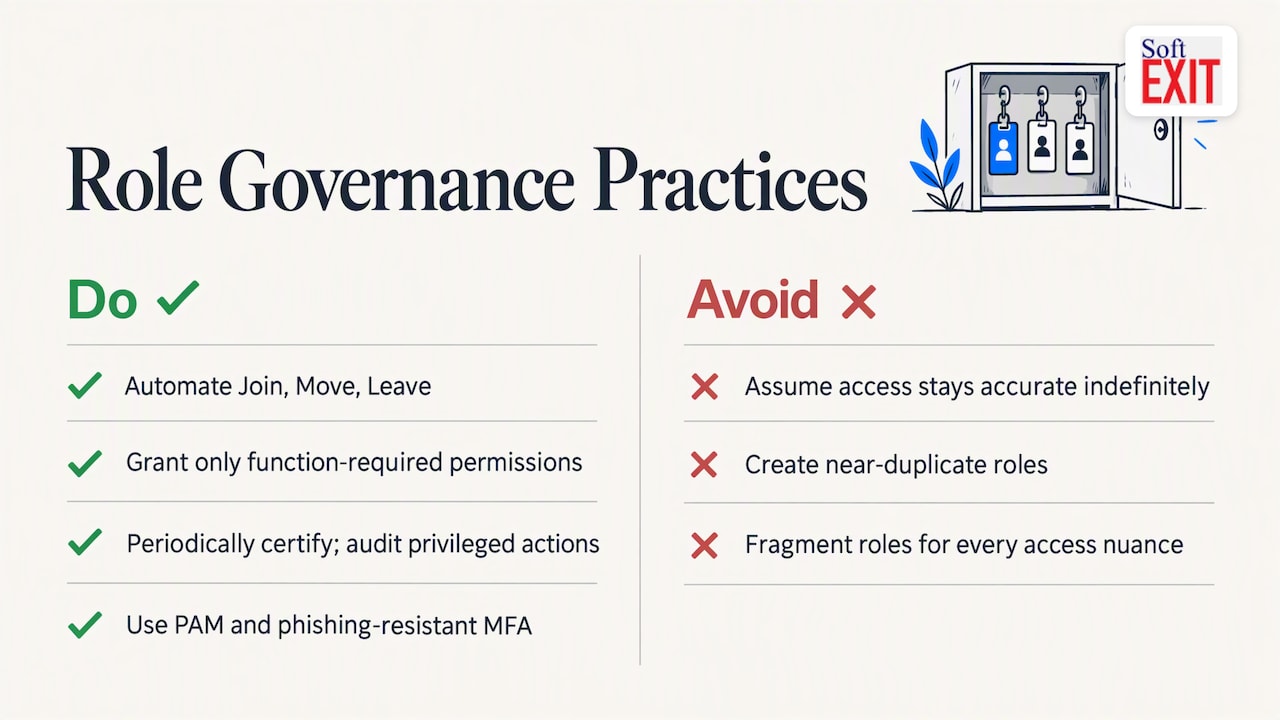
RBAC only delivers value if the roles behind it stay accurate, which means treating role management as an ongoing governance process, not a one-time setup. The Join, Move, Leave (JML) lifecycle should be automated wherever possible: new hires get roles assigned automatically, transfers trigger role updates, and departures trigger immediate revocation.
Least privilege remains the governing principle: every role should carry only the permissions its function requires, confirmed through periodic access certifications rather than assumed indefinitely. Privileged roles deserve extra controls, including privileged access management (PAM) and phishing-resistant multifactor authentication, along with logging and auditing on every privileged action.
On the design side, canonical role naming prevents confusion across teams, and limiting role cardinality avoids “role explosion,” where hundreds of near-duplicate roles make the system harder to audit than individual permissions would have been. When a handful of roles cannot capture every nuance of department or team-level access, that is the signal to layer in narrower access groups or field-level protections rather than fragment the role structure itself.
Pro Tip: Build your initial role set from existing job titles and HR records; refine with narrower access rules only after real usage shows a gap.
How SoftEXIT Studio applies RBAC with Access Groups and protected fields
SoftEXIT Studio applies these same RBAC principles directly to how teams manage CRM and business application data, without requiring a developer to write permission logic. We structure platform roles around four levels: administrators, solution administrators, standard users, and read-only users, each carrying a defined set of permissions for reading, writing, importing, exporting, and managing records.
Rather than stopping at a single system-wide role, we let organizations apply access controls at multiple layers:
- Entire solutions or individual tables can be restricted to specific roles.
- Components, menus, and views can be shown or hidden based on who is logged in.
- Individual protected fields keep sensitive data visible only to the roles that need it.
- Access Groups provide tailored visibility and permissions to departments or teams without custom code.
- My Data filters restrict a user’s view to only the records tied to their own account, supporting role-specific data visibility.
Readers who want the full feature list can check the SoftEXIT Studio glossary or see these controls applied directly in the SoftEXIT CRM walkthrough.
What actually matters when you design role-based permissions
Most RBAC rollouts fail not from weak software but from role design that tries to solve every edge case on day one. Start broad: a handful of roles mapped to real job functions will cover most of an organization’s needs far better than fifty narrow ones nobody remembers the purpose of.
Automate the JML lifecycle before you worry about fine-grained permissions, since stale access from departed employees is a far more common risk than a role being slightly too broad. Refine later with Access Groups and protected fields once actual usage shows where the gaps are.
A workable starting checklist: map job functions to roles, assign permissions to those roles rather than to individuals, automate provisioning and deprovisioning, and schedule a quarterly review of who holds what.
— James Edgell
Put configurable role-based security to work without a development team
We built our platform so that role-based security, Access Groups, protected fields, and hierarchical data controls are configuration choices, not development projects. Instead of waiting on engineering time to adjust who can see a pipeline or export a report, your team sets that visibility directly within the platform.

Organizations that want a guided setup can bring in our Professional Services team to configure roles, Access Groups, and protected fields around existing job functions. For teams further hardening their broader security posture, OK Technology’s cybersecurity resources cover complementary practices like training and infrastructure hardening alongside platform-level access control.
See how these controls work inside a live CRM in the SoftEXIT CRM walkthrough, or review plan details on the Starter, Professional, and Enterprise overview to find the right fit for your team.
FAQ
What is role-based access control in simple terms?
Role-based access control assigns system permissions to job roles rather than to individual users, so access follows function instead of identity. A user gains or loses permissions automatically when their assigned role changes, which centralizes permission management at the role level instead of per account.
How is RBAC different from ACL-based access control?
An access control list attaches permissions directly to each resource, requiring updates across every file or table whenever a person’s access needs change. RBAC centralizes those permissions in roles, so a single role assignment change updates access across every resource tied to that role.
When should an organization use ABAC instead of RBAC?
ABAC fits situations where access decisions depend on shifting context, such as time of day, device, or location, rather than stable job function alone. Many organizations run RBAC for the bulk of predictable access decisions and layer attribute checks on top for exceptions.
What are common RBAC roles in a CRM system?
Typical CRM roles include an administrator with full configuration rights, a solution administrator managing a specific application area, a standard user with day-to-day read and write access, and a read-only user limited to viewing records. SoftEXIT Studio structures these roles alongside Access Groups and protected fields so permissions can be tailored by department without custom coding.
How often should role assignments be reviewed?
Security guidance recommends periodic access certifications rather than a one-time setup, with quarterly or similarly scheduled reviews catching roles that have drifted from actual job duties. Pairing these reviews with automated Join, Move, Leave provisioning keeps access current between formal audits.
Sources
- Role Based Access Control | CSRC
- Identity and Access Management: Recommended Best Practices for Administrators