No Code Path: Best Risk Management Software to Pilot This Quarter

Our shortlist for 2026 centers on five platforms worth a demo: LogicGate Risk Cloud, IBM OpenPages, Resolver Core, SAI360, and SoftEXIT Studio. For organizations that need a risk register and dashboards configured around their own process rather than a vendor’s fixed template, we recommend starting with SoftEXIT Studio, since its no-code setup and AI-assisted configuration cut implementation time without locking you into rigid workflows. A full comparison table and vendor summaries follow below.
TL;DR:
IBM OpenPages, SAI360, and Fusion Framework System include extensive control libraries and regulatory mappings, but implementations often span multiple months.
Organizations with heavily regulated, standardized control libraries may need a traditional GRC suite; teams changing taxonomies quickly can favor configurable registers.
A useful pilot covers one department or risk category, uses a minimal taxonomy, and tracks two or three KPIs, with likelihood and impact scored from 1–5.
SoftEXIT Studio lists Starter at $14 and Professional at $24 per user monthly; compare three year costs including services, support, integrations, and seat growth.
Before piloting, verify API coverage, data residency, encryption, role based access, and audit trails, and confirm each risk can have a named owner.
Table of Contents
How We Built This Shortlist of Risk Management Tools
Picking a risk register platform is less about finding the single best engine and more about matching configurability, deployment model, and integration depth to how your organization actually tracks issues today. We pulled this list of twelve from products that repeatedly surface across analyst roundups, vendor documentation, and buyer review sites, then weighed them against the practices the U.S. GAO associates with effective enterprise risk management: clear risk ownership, consistent likelihood and impact scoring, and monitoring tied to a documented risk appetite.
Some entrants here are purpose-built governance, risk, and compliance (GRC) suites. Others are adjacent platforms, like project management tools or log analytics products, that organizations stretch to cover lightweight risk tracking. We note that distinction throughout, because a security team bolting risk fields onto a SIEM tool is solving a different problem than an enterprise rolling out a formal GRC program.
-
SoftEXIT Studio is a no-code, AI-assisted application platform. Rather than shipping a fixed risk module, it lets you configure your own risk register, fields, scoring scales, and dashboards, then expand the same platform into CRM, inventory, or contract tracking later. Its App Store supplies starter templates, and Micro-Workflows guide data entry for owners without requiring a full workflow engine.
-
LogicGate Risk Cloud runs on a workflow-orchestration model built for integrated risk programs that need structured process routing across departments.
-
IBM OpenPages is an enterprise GRC platform aimed at large organizations with layered governance, audit, and regulatory reporting needs, and it integrates with the broader IBM software stack.
-
Resolver Core (also marketed as Resolver ERM) ties incident management directly to the risk register, so an event logged in the field can roll up into risk scoring and executive reporting.
-
SAI360 bundles enterprise risk, compliance, and environmental health and safety (EHS) functionality into one suite, suited to organizations managing all three disciplines together.
-
StandardFusion focuses on mid-market compliance programs, with control mapping and audit-readiness features that help smaller GRC teams stay inspection-ready.
-
Corporater folds risk management into a broader business performance management platform, useful for organizations that want risk indicators sitting next to operational and financial KPIs.
-
Mitratech Alyne automates compliance assessments and control testing on a cloud platform, reducing manual assessment cycles for compliance-heavy teams.
-
ManageEngine Log360 is primarily a security information and event management (SIEM) tool; its risk angle comes from tying log and event data to detection-driven risk indicators, which suits security operations teams more than enterprise risk officers.
-
Wrike is a general work management platform. Some teams use its project templates for lightweight, project-level risk tracking, though it lacks dedicated risk register scoring or compliance mapping.
-
Fusion Framework System targets operational risk measurement in financial institutions, with features built around regulatory stress-testing and resilience planning.
-
Pirani specializes in critical-event and incident response coordination, which makes it a fit for organizations whose main risk concern is operational resilience during live disruptions.
Each of these serves a different point on the spectrum between heavyweight GRC depth and lightweight, adaptable tracking. The next section lines them up side by side.
Comparing Risk Management Platforms Side by Side
One finding worth flagging: the GAO’s enterprise risk management framework names risk ownership and monitoring indicators as core elements of a mature program, and platforms that make owner assignment and status tracking simple to configure tend to see faster adoption than ones that force a rigid data model on day one.
The clearest trade-off in this table is between configuration speed and out-of-the-box depth. IBM OpenPages, SAI360, and Fusion Framework System ship with extensive built-in control libraries and regulatory mappings, which suits organizations that need those structures immediately and have the implementation budget to match. Platforms like SoftEXIT Studio, StandardFusion, and Wrike trade some of that pre-built depth for faster setup and lower configuration complexity, which matters more for teams that want a working risk program this quarter rather than next year.
How to Choose Risk Management Software
Selecting a platform comes down to matching its data model and deployment shape to how your organization already works, not to which vendor has the longest feature list. Work through these criteria in order:
-
Fit to process and configurability. Can you define your own risk categories, fields, and scoring scale, or are you locked into the vendor’s taxonomy? A platform that forces your process to bend around its schema usually slows adoption.
-
Data roll-up and taxonomy. Confirm the tool can roll cybersecurity and operational risks into a single enterprise view. NIST IR 8286 describes this roll-up as a maturity marker, since leadership needs one composite picture rather than siloed registers.
-
Integrations and APIs. Check whether the platform connects to your identity provider, ticketing system, and any SIEM or audit tools already in place.
-
Security and compliance posture. Ask about data residency, encryption, and role-based access controls before any pilot begins.
-
Onboarding and services. Determine whether implementation is self-service, vendor-assisted, or requires a professional services engagement, and get that cost in writing.
-
Total cost of ownership and licensing model. Per-user subscription, tiered, and quoted-enterprise models all carry different hidden costs as you scale seats.
-
Vendor roadmap. Ask how often the product ships configuration changes and whether upgrades require re-testing your customizations.
Before signing anything, ask each vendor these questions directly: What does the API cover, and is it rate-limited? What is the uptime SLA? Where is data hosted, and can that be restricted by region? Are there limits on custom fields, workflows, or dashboards at your plan tier? How often do major upgrades occur, and do they ever require reconfiguration?
Watch for these red flags during evaluation: no clear way to assign a named owner to each risk and action, no audit trail showing who changed a score and when, a data model that cannot absorb a new risk category without a change request to the vendor, a vague answer when you ask about integration with your existing stack, and any sales conversation that treats implementation as purely an IT project rather than a joint effort with risk owners.
A simple scoring exercise helps compare finalists objectively.
Pro Tip: Run your scoring exercise with the same three or four real risks from your current register in every demo, so you are comparing how each platform actually handles your data rather than a generic sample dataset.
Rolling Out a No-Code Risk Register: A Step-by-Step Pilot
Moving from a selected platform to a working pilot takes a defined scope and a short list of fields, not a months-long build.
Start by defining pilot boundaries: pick one department or risk category, set a target timeline, and choose two or three KPIs to track, such as time-to-value, number of risks onboarded, and dashboard adoption among named owners.
Next, map your risk taxonomy before touching the software. Decide on essential fields (risk ID, title, owner, likelihood, impact, status, mitigation actions) and a simple scoring scale, commonly 1 to 5 for both likelihood and impact, as suggested in GAO’s enterprise risk management guidance. Keep the pilot schema minimal and expand once it proves out.
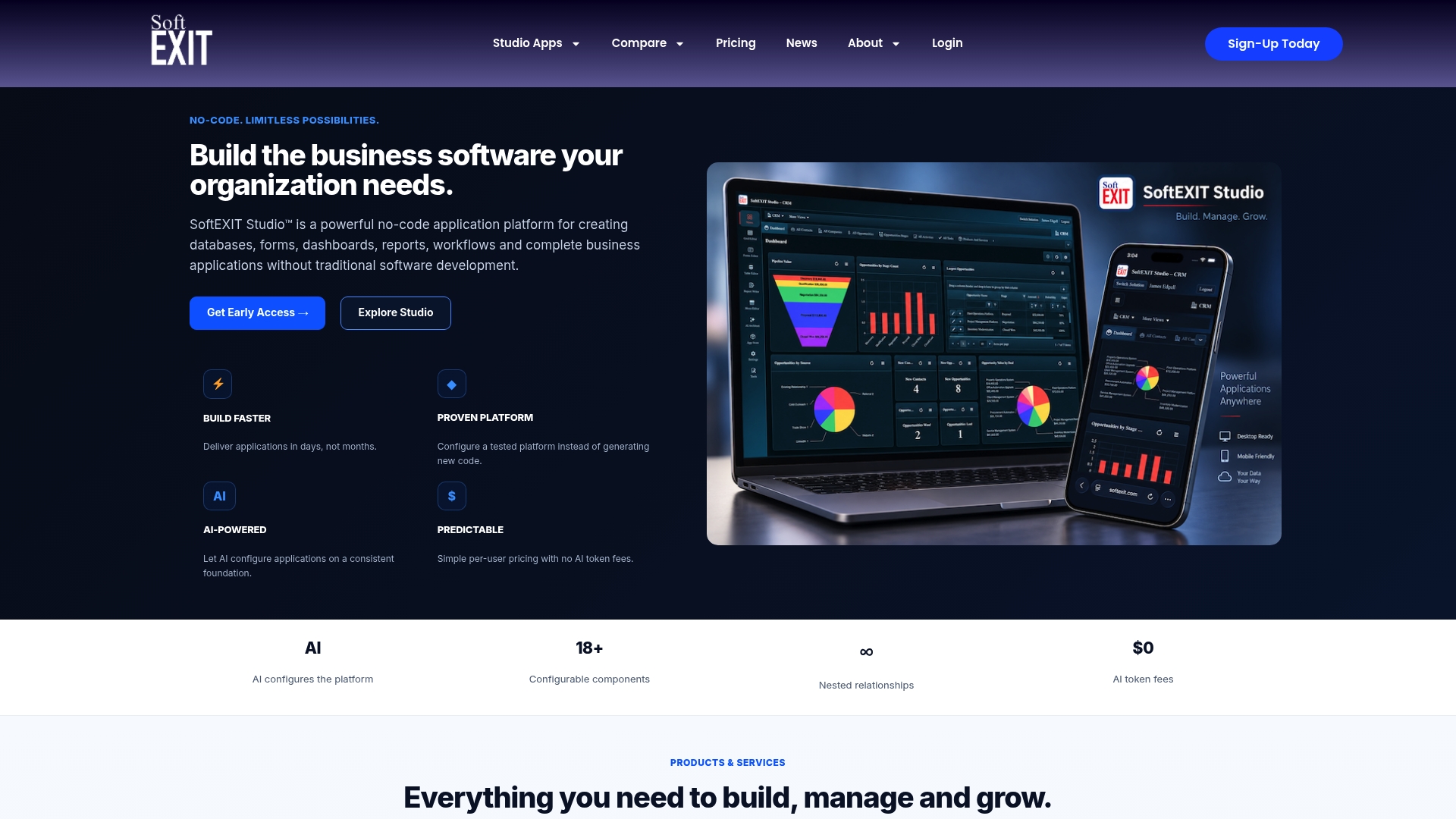
In a platform like SoftEXIT Studio, this maps directly onto a configurable risk register including projects, risks, issues, and actions as distinct but linked records. Each record can have an assigned owner, probability and impact scoring, and a customizable status field.
-
Build dashboards and charts for executive visibility, configure My Data views that filter for each owner’s assigned risks and actions.
-
Establish filtered views for high-priority, critical, overdue, and user-specific tasks, enabling owners to open a focused worklist.
-
Use Micro-Workflows to guide data entry without requiring a complex workflow engine.
-
Utilize AI Architect and App Store templates to quickly create forms, grids, and dashboards.
Where configuration needs to outpace internal bandwidth, professional services can help with initial setup and training offered by managed IT and cybersecurity experts.
Pro Tip: Launch the pilot with real risks from your current spreadsheet or legacy tool, not placeholder data, so owners see their actual worklist in the new system from day one.
Alt text: Dashboard view of a configurable risk register showing risk owners, probability and impact scores, and status tracking.
Our Methodology for This Comparison
We built this list from analyst and buyer-review listings, including Capterra’s risk management software directory, vendor documentation, and public guidance from the GAO and NIST. Inclusion required a product to appear across multiple independent sources rather than a single listing.
We evaluated each platform on deployment model, configurability, integration depth, security posture, and target organization size, using only what vendors publish or what appears in review aggregators. Where SoftEXIT Studio appears, we disclose that it is our own platform and describe it factually alongside the others rather than scoring it as an independent reviewer would.
Public documentation does not always capture every pricing detail or recent feature change, so we recommend verifying current specifics directly with each vendor during a formal RFP process.
What to Expect From Implementation Timelines
Timelines vary sharply by platform category. Enterprise GRC suites like IBM OpenPages, SAI360, and Corporater typically involve a scoping phase, a configuration phase handled jointly with the vendor or a systems integrator, and a testing period before go-live, often spanning multiple months given the depth of control libraries and integrations involved.
Mid-market and no-code platforms compress that cycle. A no-code platform like SoftEXIT Studio lets risk owners and administrators configure the register, scoring scales, and dashboards directly, without waiting on a development queue, which shortens the gap between contract signature and a working pilot.
Regardless of platform, onboarding generally follows a similar sequence: initial taxonomy and field mapping, pilot configuration for one department or risk category, user training for owners and administrators, dashboard validation with leadership, and a phased rollout to additional departments. Teams that skip the taxonomy mapping step tend to rebuild their register months later once inconsistent scoring surfaces in reporting.
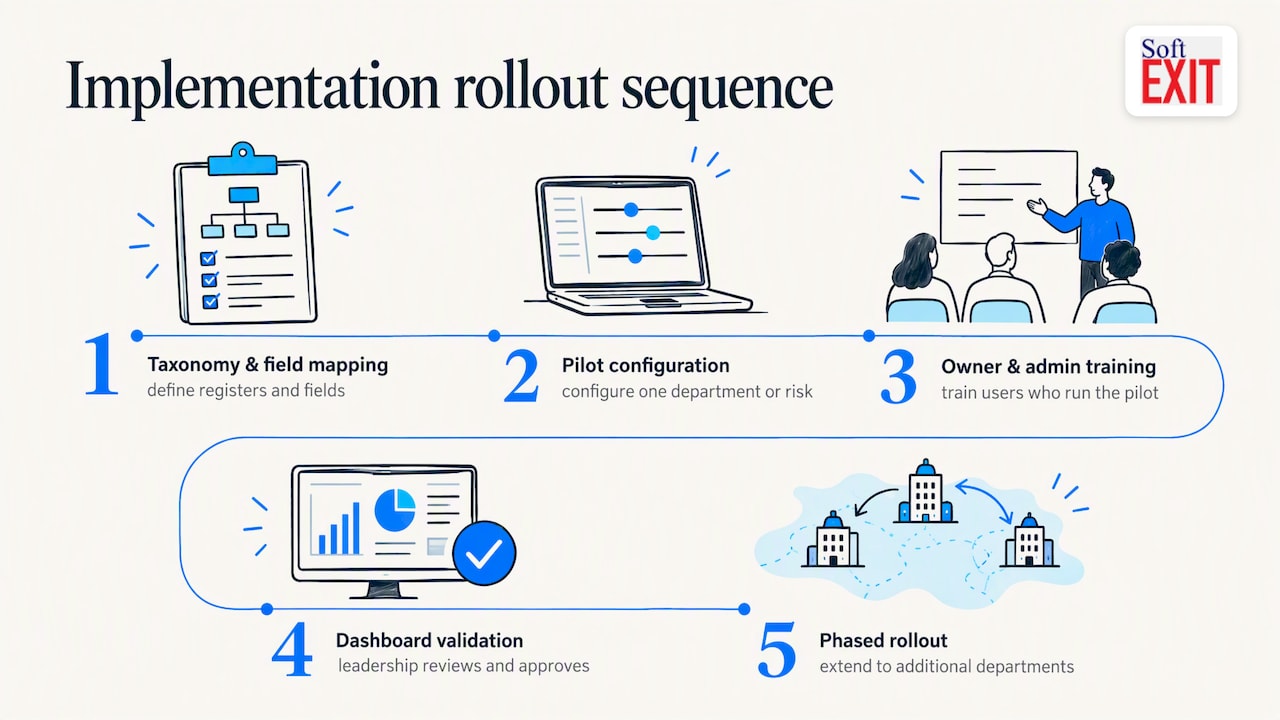
Vendor-assisted services can shorten this further for organizations that prefer hands-on configuration support rather than a fully self-service rollout, particularly when integrating with existing identity or ticketing systems.
Understanding the Total Cost of Ownership
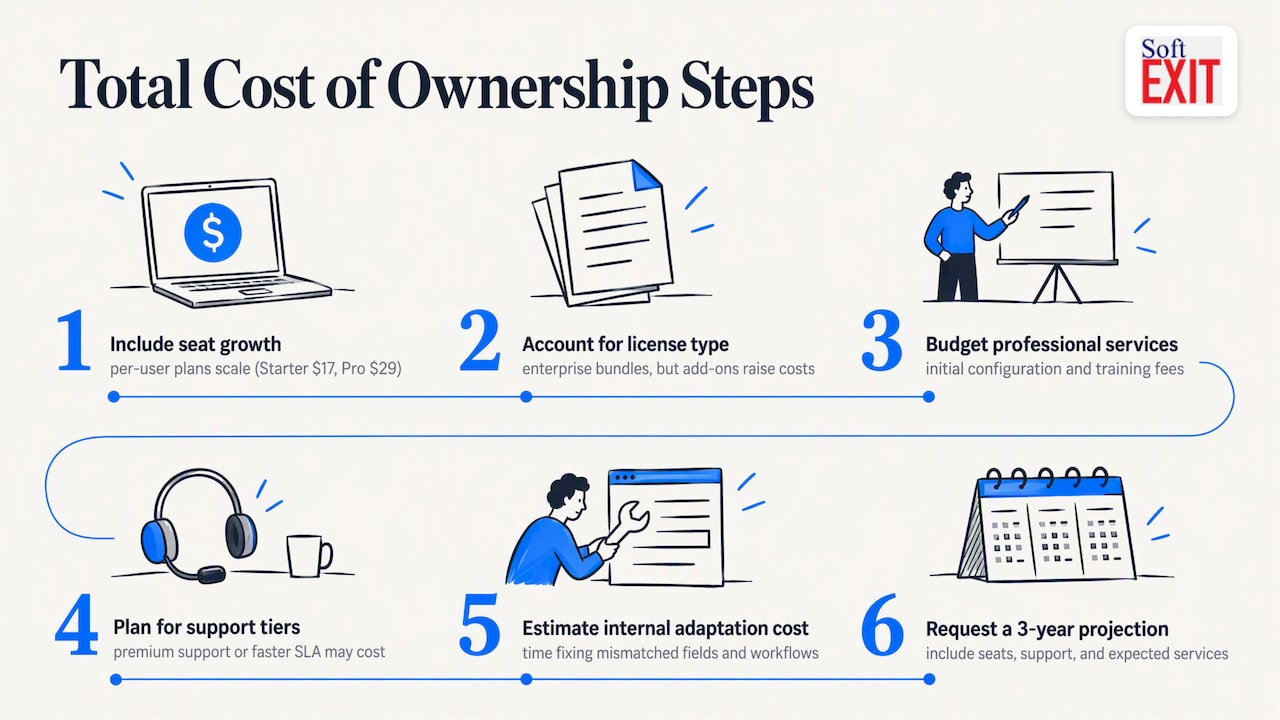
The sticker price on a risk management platform rarely reflects what you pay by year two. Per-user subscription models, like SoftEXIT Studio’s Starter plan at $14 per user per month and Professional plan at $24 per user per month, scale predictably as you add seats, which makes budgeting straightforward for growing teams.
Quoted enterprise licensing, common among IBM OpenPages, SAI360, and Fusion Framework System, often bundles implementation and support into the initial contract, but add-on modules, additional environments, or expanded user tiers can push costs up after the first renewal.
Hidden costs to ask about directly: professional services for initial configuration, training for new owners as headcount grows, charges for premium support tiers or faster SLA response, and fees for custom integrations beyond what ships standard. Platforms with a rigid data model sometimes carry an additional cost: the internal time spent working around fields and workflows that do not match your process, which rarely appears on an invoice but shows up in slower adoption.
Before signing, ask each vendor for a three-year cost projection that includes seat growth, support tier, and any professional services you expect to need, not just the first-year license fee.
When a No-Code Platform Makes Sense for Risk Management
A configurable, no-code platform earns its place when your organization needs to adapt its risk taxonomy quickly, when no two departments score risk quite the same way, or when you want the same system to eventually cover contracts, inventory, or CRM. That flexibility comes with a trade-off: organizations with heavily regulated, standardized control libraries may still need a traditional GRC suite’s prebuilt mappings. Features like configurable registers, My Data views, Micro-Workflows, and AI Architect map well to a team that wants ownership and speed over a fixed rulebook.
— James Edgell
Try SoftEXIT Studio for Your Risk Program
SoftEXIT Studio lets you configure a risk register, projects, issues, and actions tailored to your team’s processes, featuring role-based security, dashboards, and Micro-Workflows to support data entry without custom development. AI Architect and App Store templates enable rapid pilot setup. Start with the Starter or Professional plan or explore the SoftEXIT CRM walkthrough to see the same platform in action.
FAQ
What Is the Best Risk Management Software?
There is no single best platform for every organization: enterprise GRC suites like IBM OpenPages and SAI360 suit large, regulated organizations, while configurable, no-code platforms like SoftEXIT Studio suit teams that want a risk register built around their own process without custom development. The right choice depends on your taxonomy, integration needs, and implementation timeline.
What Is the Most Well-Known Risk Management Framework?
Among practitioners, the NIST Risk Management Framework is one of the most widely referenced, outlining a lifecycle of preparing, categorizing, selecting, implementing, assessing, authorizing, and monitoring controls. The GAO’s enterprise risk management guidance is another frequently cited reference, particularly for its six core elements of effective risk programs.
What Makes a Risk Management Program Effective?
An effective program assigns clear owners to each risk, uses a consistent likelihood and impact scoring scale, and monitors indicators against a documented risk appetite, as outlined in GAO’s enterprise risk management research. Software that makes owner assignment and status tracking simple to configure tends to support faster, more consistent adoption of these practices.
How Long Does Risk Management Software Take to Implement?
Enterprise GRC suites often take several months to configure and test given their control library depth, while no-code platforms can move from contract to working pilot much faster since owners configure registers and dashboards directly. Timelines depend heavily on how much integration work with existing systems is required.