Purchase Order Tracking: How to Track POs and Replace Spreadsheets

Purchase order tracking means following each PO from request to payment so you always know its status and what needs attention. A spreadsheet can start the job, but a small team outgrows it quickly. The better answer is a tracker built as a real business application, with forms, approvals and dashboards, on the same platform as your CRM. SoftEXIT Studio is a no-code platform where you can build exactly that, with membership starting at $5 per user/month, billed annually.
Key Takeaways
- Tracking is about status and exceptions, not storing a copy of the PO. Record who approved it, what the supplier confirmed and what actually arrived.
- One “due date” column is not enough. Keep the requested date, the supplier-committed date, any revised dates and the receipt date.
- Switch from a spreadsheet when several people can commit money, approvals happen in email, or volume passes roughly 50 POs a month.
- Apps are included with a SoftEXIT Studio membership starting at $5 per user/month, billed annually, so a custom PO tracker needs no separate app subscription.
What purchase order tracking actually involves
A purchase order (PO) is the document you send a supplier to commit to buying specific items at agreed prices. Tracking follows it through its lifecycle: requested, approved, issued, fulfilled, invoiced and paid. As Amazon Business puts it, a saved copy shows the order exists, while tracking shows where it is.
A useful record per PO captures:
- PO number, supplier, requester and approver
- Line items with quantities, unit prices and total
- Payment terms such as Net 30 or Net 60, and budget code (GL code)
- Order date, expected delivery date and shipping address
- Delivery status, invoice match and payment history
Stampli’s list of PO data also adds approval history, communications and measures such as on-time delivery.
The stages to track, step by step
- Capture the request. Record requester, item, quantity, estimated cost and budget owner. This goes wrong when requests arrive by chat and never reach the log.
- Track approval. Store approver, decision date and approved amount. Keep requester and approver as different people so the trail holds up in an audit.
- Issue the PO. Assign the number, supplier, terms and expected delivery date.
- Monitor supplier confirmation. Log the confirmation date and any revised date.
- Record receipt. Note received and remaining quantity and any quality flags.
- Match and close. Compare PO, receipt and invoice before payment. SAP’s lifecycle course describes the same sequence: PO, supplier fulfillment, receipt, invoice reconciliation, then payment.
The match matters in dollars. In Nventory’s example, a PO for 500 units at $8.00 ($4,000) receives only 450 units. A two-way match approves the full invoice, while a three-way match flags the $400 overbilling. For a deeper look at automating that last step, see this guide to automated three-way invoice matching.
Recording delays, partial deliveries and changes
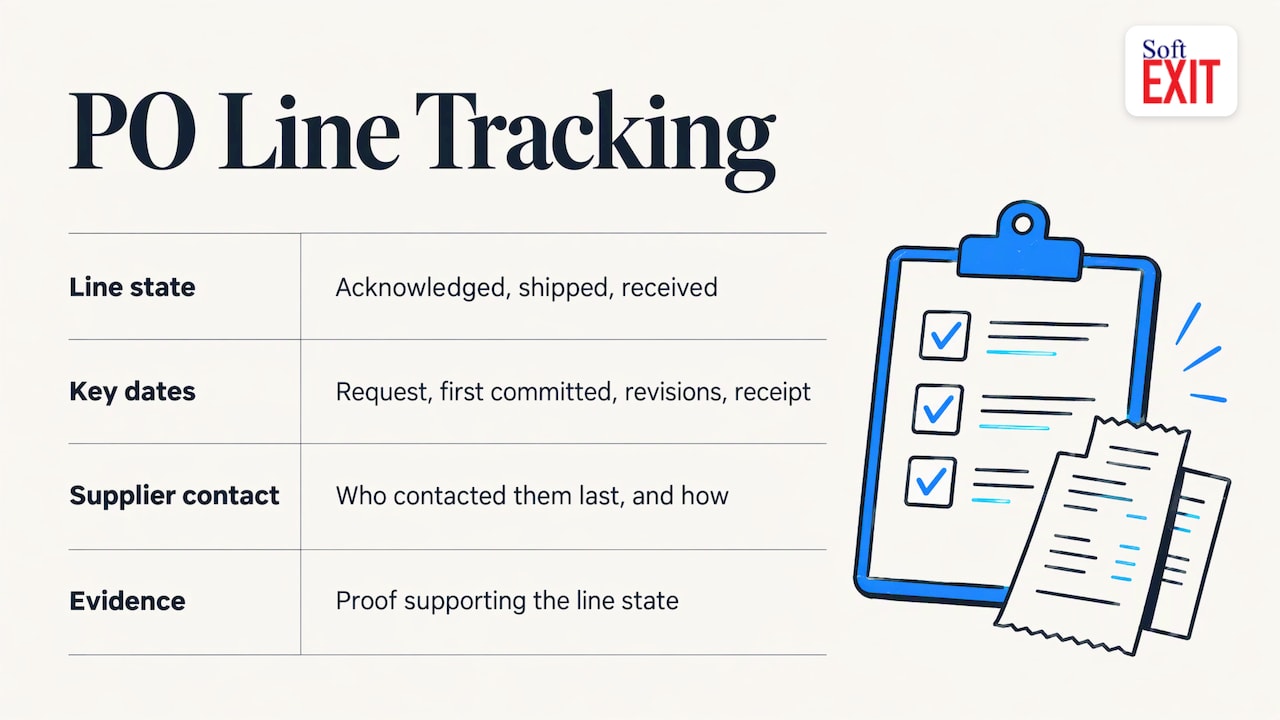
Marking every unreceived line “open” hides the difference between a line with a confirmed date and one nobody has heard from in weeks. Cartograph recommends four things per line: a state (acknowledged, date confirmed, shipped, received), four dates (request, first committed, each revision, receipt), who last contacted the supplier and how, and the evidence behind the state.
A practical status list: Open, Acknowledged, Partially Received, Fully Received, Invoice Matched, Closed, Cancelled, Disputed.
Following up when a supplier goes quiet
- State an acknowledgment deadline on the PO itself, commonly 24 or 48 hours, and say what must be confirmed: quantity, price, delivery date and terms.
- If nothing arrives within two business days, send a short message restating the PO number and needed date, and copy the requester. Call for critical orders.
- Assign one follow-up owner and set a next follow-up date separate from the promised delivery date. ONES notes that a supplier saying “shipped” is not proof of receipt.
If your POs live in email, the fix is the same: give each PO a single record with a status and a next-action date, and log each supplier reply there rather than leaving it in an inbox.
Spreadsheet or software?
A spreadsheet works when one or two people place orders at low volume. Foxpedite’s switch-point checklist says two or more of these signals mean the sheet costs more than it saves:
- More than two people can commit money
- Approvals happen in email, text or Slack
- The sheet is updated after orders are placed
- An invoice was paid twice or for goods that never arrived
- Volume exceeds about 50 POs a month
Features worth having: approval workflows, supplier and item databases, partial receiving against the PO, budget limits, status tracking and role-based permissions.
Budgets, vendors and audit trails
Open POs are committed spend. Precoro explains that tracking them keeps a department from appearing to have budget left when open POs have already claimed it. Each PO also links request, approval, supplier agreement and payment into one trail, and PO history shows which suppliers hit their dates. For approvals that auditors can trace, this document approval workflow guide is a useful companion.
Build your PO tracker in SoftEXIT Studio
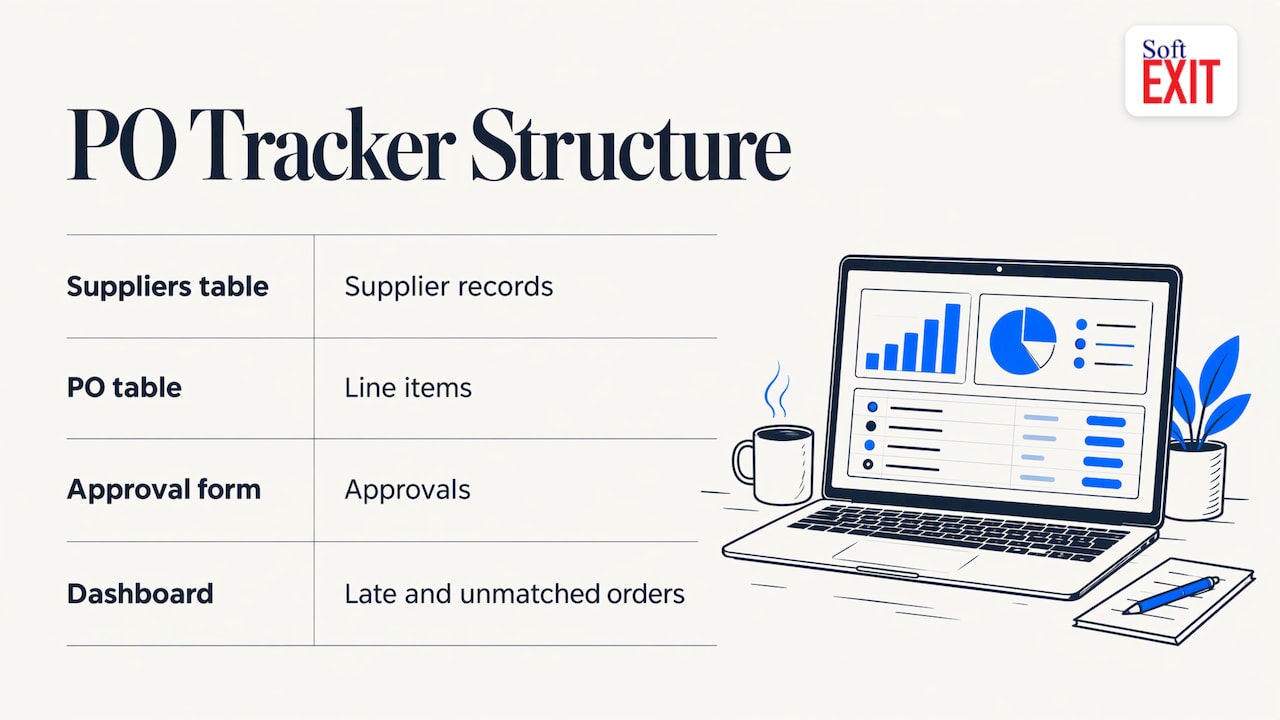
SoftEXIT Studio lets you create relational databases, design forms, develop dashboards and generate reports without writing code. A PO tracker maps directly onto that: a suppliers table, a PO table with line items, an approval form, and a dashboard of late and unmatched orders. Role-based security and protected fields control who can see and edit what. Professional includes AI Architect, which turns plain-language requirements into application configurations. For layout ideas, see our guide to operational dashboards and how to build a database you can trust.
Studio Starter costs $5 per user/month, billed annually. Studio Professional costs $9 per user/month, billed annually. Apps such as SoftEXIT CRM and Contract Manager are included with membership at no per-application subscription cost, so supplier contracts and customer records sit beside your POs. There is a 21 day free trial.
Start with SoftEXIT Studio and set up your first PO tracker on one platform.
Our perspective
Most teams start PO tracking in a spreadsheet because it is free and familiar. The trouble is that a sheet records what happened after the fact. A tracker should show what needs attention today: the line with no supplier confirmation, the invoice that does not match the receipt, the budget already claimed by open orders.
We built SoftEXIT Studio so that a business can design that tracker itself, with forms, relational data, dashboards and permissions, instead of buying a separate application for every process. Because every app runs on the same platform, purchasing, contracts and customer data can be connected rather than copied between tools.
Start small: one PO table, one approval form, one dashboard. Extend it as your process matures.
James Edgell
FAQ
What is the best way to track purchase orders?
Give every PO one record with a status, approver, dates and supplier confirmation, and review exceptions on a dashboard. A no-code app on SoftEXIT Studio lets you build that structure around your own process.
How do I follow up on an unacknowledged purchase order?
If the supplier has not confirmed within two business days, send a short message with the PO number and required delivery date, and copy the requester. Phone for critical orders and log each response.
What should a PO tracker include?
At minimum: PO number, supplier, requester, approver, line items, total, payment terms, expected and actual delivery dates, status and invoice match.
When should I leave my spreadsheet behind?
When several people can commit money, approvals happen in email, or you pass roughly 50 POs a month, it is time for an application with approvals and permissions.
Sources
- Purchase order tracking: a complete step-by-step guide, Amazon Business
- Stop juggling POs, Stampli
- Define the Purchase Order Lifecycle, SAP Learning
- PO Systems for Small Business, Nventory
- Purchase order tracking: dates, follow-up and expediting, Cartograph
- Purchase Order Acknowledgment, LearnHowToSource
- Supplier order follow-up, ONES
- Spreadsheets vs Purchase Order Software, Foxpedite
- Purchase Order Tracking: The complete guide, Zip
- What Is a Purchase Order?, Precoro
- AI Invoice Processing: Automated 3-Way Matching
- Document Approval Workflow, Casefile