SOFTEXIT STUDIO VS MICROSOFT INFOPATH
InfoPath support has ended. Build what comes next.
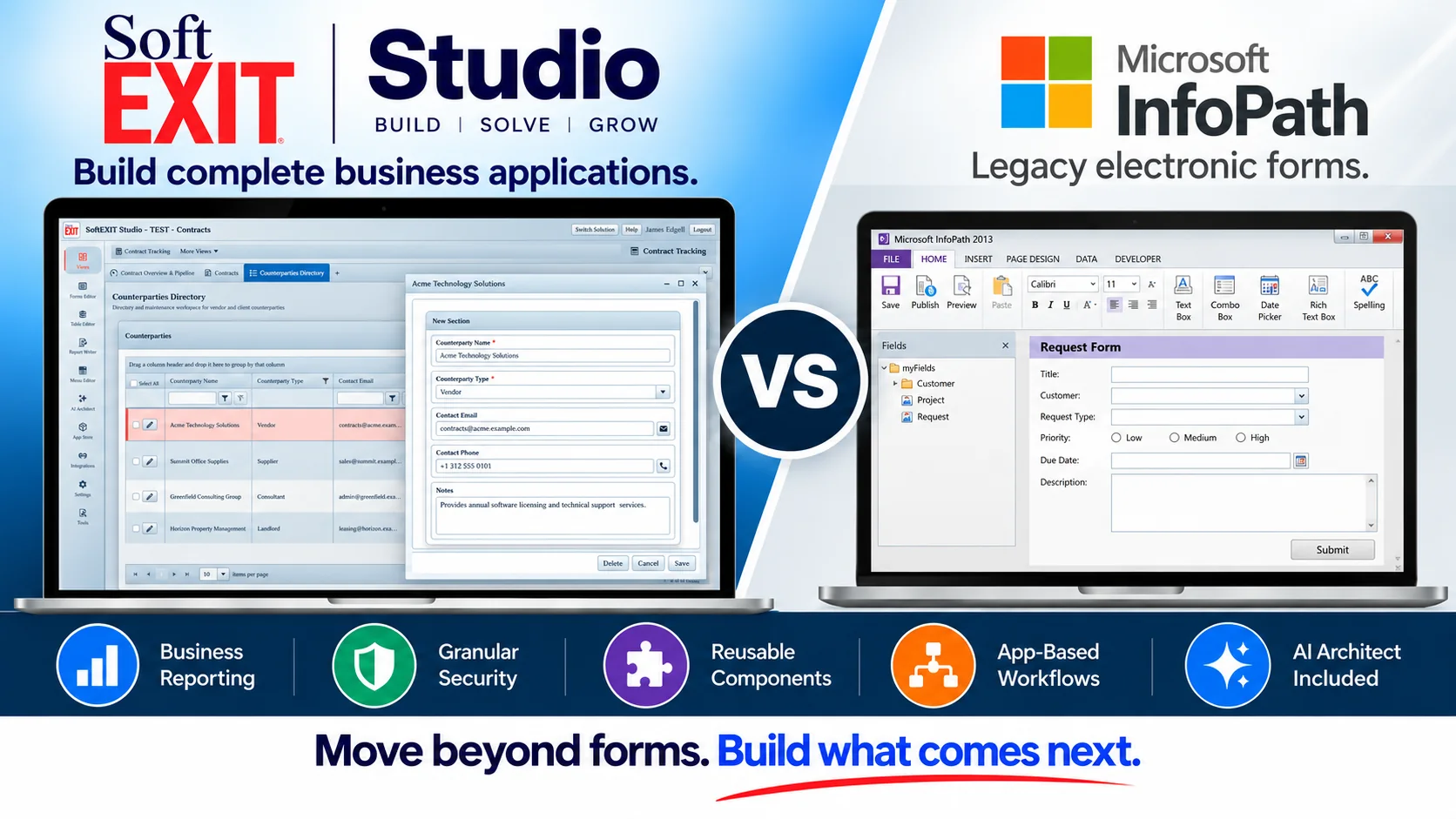
InfoPath helped organizations replace paper forms with structured electronic forms. SoftEXIT Studio offers a broader foundation: connected business records, configurable forms, role-based access, dashboards, reporting and reusable application components.
Move beyond form templates. Create the business application surrounding your data.
Connected records
Relational tables and parent-child data
Guided forms
Fields, lookups and validation
Live dashboards
Grids, charts and KPIs
Granular security
Access Groups and protected fields
AI Architect
No Studio per-token charges
From electronic forms to connected applications. Studio organizes shared data, operational views and permissions around a reusable relational foundation.
Microsoft InfoPath 2013 end-of-support date
InfoPath Forms Services retirement in SharePoint Online
SoftEXIT Studio free trial, up to 3 users, no credit card
Studio AI Architect per-token charges
A form collects data. An application puts that data to work.
InfoPath could validate fields and connect to SharePoint, XML files, databases or web services, depending on deployment. Studio is designed for the work surrounding the form: maintaining related records, controlling access and reporting on operations.
Connected business data
Keep contracts, vendors, clients, contacts and activities in related tables rather than separate form submissions.
Operational visibility
Use record grids, charts, gauges, dashboards and filtered PDF reporting over the same data.
Reusable components
Configure forms, application navigation, security and shared views across multiple solutions without building a new codebase.
Studio vs. InfoPath: a complete application or an electronic form?
InfoPath was a capable form designer. Studio brings together business data, user interfaces, operational reporting, security and reusable application components. Differences below depend on each InfoPath deployment and its connected services.
Product lifecycle
Actively developed application platform with a 21-day self-service trial.
InfoPath 2013 support ended July 14, 2026; Microsoft scheduled the retirement of SharePoint Online InfoPath Forms Services after that date.
Core purpose
Build complete business applications with data, forms, views, navigation and reports.
Design and fill electronic forms; a broader application often required SharePoint or companion systems.
Data and storage
Structured relational tables, lookups and parent-child records within Studio.
XML forms, SharePoint lists or libraries, and database/web-service connections depending on form design.
Form capabilities
Configurable forms with validations, lookups, multiple field types and scanning.
Form templates, rules, repeating sections, validation and conditional formatting; deployment options varied.
Operational views
Interactive grids, grouping, filters, status boards, dashboards and reusable views.
Primarily focused on form entry; operational views depended on SharePoint or connected applications.
Business reporting
Report Writer with filtering, grouping, summaries and PDF output.
No comparable standalone InfoPath business report writer; other tools supplied broader analytics.
Security and roles
Access Groups, ownership, protected fields and application-level permissions.
Actual security was provided largely by SharePoint, file storage, accounts and external systems.
AI-assisted setup
AI Architect configures Studio components without generating an independent codebase or Studio token fees.
No built-in generative AI-based application configuration in InfoPath 2013.
Reuse and scaling
Reusable forms, charts and reports with multiple solutions and eligible Internal App Store features.
Reusable form templates; full-application reuse relied on wider Microsoft tooling.
Workflows
Form-level Micro-Workflows and Professional integrations where supported; broader automation requires assessment.
Form rules and data connections; SharePoint workflows or other tools provided broader automation.
Migration effort
Reconfigure forms and structure source data in Studio; validate each process and its integrations.
Existing .xsn templates, .xml records, rules and connected services require evaluation; there is no one-click Studio conversion.
Best fit
Related records and repeatable multi-user processes needing roles, reports, dashboards and growth.
Historical electronic-form solutions requiring maintenance or migration to supported alternatives.
Capabilities are representative, not a promise of identical workflow behavior or automatic conversion. InfoPath features varied by form and deployment. SoftEXIT Studio does not claim native .xsn import or migration of SharePoint workflows. Lifecycle guidance: Microsoft, July 2026.
Modernize the business process, not just the form.
✓ Connected data. Parent-child records connect people, contracts, assets and events without manually reconciling forms.
✓ Built-in application views. Put grids, menus, dashboards, reports and forms over shared operational data.
✓ Fine-grained access. Use Access Groups, field protection, record ownership and roles.
✓ AI-assisted configuration. AI Architect sets up Studio components without separate code generation or Studio per-token charges.
Studio pricing
Starter
/ user / month, billed annually
Professional
/ user / month, billed annually
Monthly billing: Starter $17/user, Professional $29/user. Studio also offers a 21-day trial with Starter-level entitlements and up to 3 users. Each active user, including administrators, uses a license.
A realistic way to move off InfoPath.
Treat modernization as a business application redesign: preserve essential data and outcomes, identify dependencies, and rebuild deliberately rather than assuming .xsn templates or workflows can be imported.
Inventory forms
Identify active .xsn templates, owners, validation, rules, attachments and dependent workflows.
Locate source data
Determine whether form data lives in XML, SharePoint libraries/lists, databases or services.
Rebuild in Studio
Configure relational tables, forms, access groups, dashboards and reports using Studio components.
Test the cutover
Validate migrated records, permissions, integrations, reports and user acceptance before replacing the process.
Choose the future based on the process you need.
Choose SoftEXIT Studio when…
You need relational operational data, guided forms, reusable views, secure teams, dashboards and PDF reporting in the same application.
Consider Microsoft Power Platform when…
Your process is deeply integrated with Microsoft 365, SharePoint, Power Apps or Power Automate and you need those ecosystem-specific capabilities.
Test one real workflow
Rebuild one representative InfoPath process, compare permissions and reporting, then evaluate migration effort using actual records and user feedback.
Before you replace an InfoPath form.
Frequently asked questions about existing InfoPath data, migration, automation and choosing a long-term replacement.
Is InfoPath still supported?
No. Microsoft ended InfoPath 2013 extended support on July 14, 2026, and scheduled the removal of InfoPath Forms Services from SharePoint Online after that date.
Can Studio import .xsn files?
No automatic .xsn form conversion is claimed. Review the template and its rules, configure the new Studio form, and migrate suitable source records separately.
Where are InfoPath records stored?
Storage varies: XML-form files in SharePoint form libraries, SharePoint lists, databases or service connections. Inspect each form to locate its actual data.
Will every workflow migrate?
No. InfoPath form rules and external SharePoint workflows require separate analysis. Studio Micro-Workflows should not be treated as a one-for-one replacement for full workflow automation.
Why not use Microsoft Forms?
Microsoft Forms is useful for surveys and straightforward data collection. Compare Power Apps or Studio when your requirements include richer relational records, access controls and application views.
Can I try Studio first?
Yes. The free trial lasts 21 days, requires no credit card and includes up to three users with Starter-level functionality.
Microsoft lifecycle information and migration guidance.
InfoPath support dates and Microsoft 365 retirement details follow Microsoft-published documentation. SoftEXIT is not affiliated with or endorsed by Microsoft. Product comparisons describe representative capabilities, not every deployment.
InfoPath 2013 lifecycle
Microsoft confirms the July 14, 2026 extended support end date.
SharePoint Online retirement
Microsoft describes the end of InfoPath Forms Services after July 14, 2026.
Microsoft migration options
Microsoft outlines supported alternatives including Power Apps and Power Automate.
Your InfoPath replacement can be more than another form.
Start with one real process. Configure connected tables, forms, permissions and reports in SoftEXIT Studio, and evaluate the results with your team.