Enterprises: Configure AI in CRM Without Code Risk, No Token Fees

AI now makes customer relationship management proactive instead of reactive: it cleans and enriches records automatically, flags the next best action for a sales rep, and drafts routine customer communication before anyone asks. Enrichment tools fill in missing contact details overnight, and lead scoring models flag which prospect to call first. None of that works, though, until the underlying data and governance are in order.
TL;DR:
- Auto-enrichment and scheduled data refresh significantly reduce manual data entry and improve record accuracy in CRM systems.
- Deduplication, identity resolution, and auto-logging are core to trustworthy AI features that ensure reliable lead scoring and forecasting.
- Investment in AI for CRM is growing rapidly, with most organizations still working to rebuild workflows and governance for measurable returns.
- Successful pilots should focus on usage, forecast accuracy, and data freshness, emphasizing workflow redesign and senior ownership.
- Configuration-based AI platforms that avoid custom code provide predictable costs and faster deployment, with an emphasis on data governance and trust.
Table of Contents
- 1. High-value use cases where AI is delivering measurable impact
- 2. Core AI capabilities and architectures that power CRM features
- 3. What the evidence shows about AI investment and results
- 4. A practical implementation checklist for pilots and rollout
- 5. SoftEXIT Studio’s approach to AI-driven CRM configuration
- 6. Privacy and ethical considerations in AI-driven CRM
- 7. Challenges and limitations of AI in CRM systems
- 8. Future trends and innovations in AI-powered CRM
- 9. Author perspective: recommended priorities for leaders adopting AI in CRM
- 10. Put AI-driven CRM configuration to work without the code risk
- FAQ
- Sources
1. High-value use cases where AI is delivering measurable impact
Not every AI feature in a CRM is worth your attention this year. A handful of capabilities are mature enough to pilot now, and the rest are still catching up to the marketing around them.
Auto-enrichment is the clearest win: instead of a rep manually searching for a prospect’s title, company size, or recent funding news, the CRM pulls it in on a schedule and keeps records current without anyone touching a keyboard. That alone removes a large share of the manual data entry that reps resent and skip.
Deduplication and identity resolution matter just as much, even though they get less attention. When two records for the same contact exist, every AI feature built on top, scoring, routing, forecasting, inherits the confusion. Clean identity resolution is what makes everything downstream trustworthy.
Auto-logging closes a related gap: calls, emails, and meeting notes get captured automatically instead of depending on a rep to remember after a long day. That keeps the pipeline current and gives next-best-action models something accurate to work from.
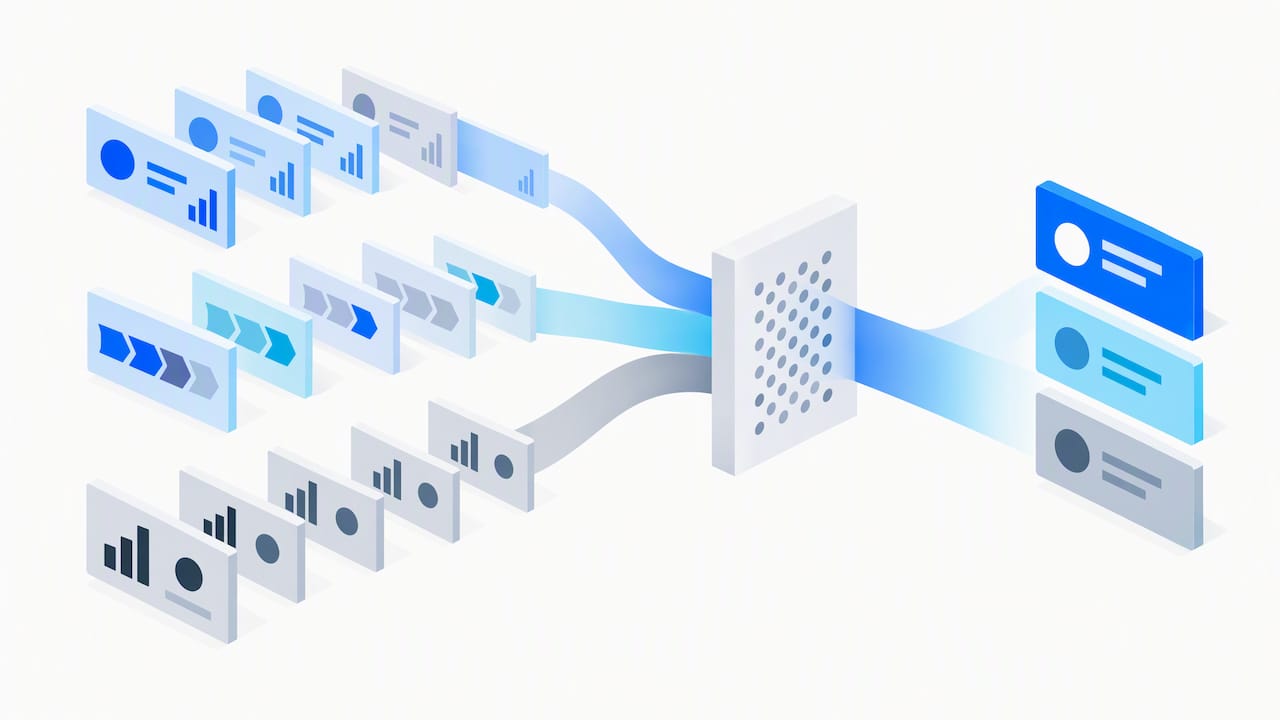
Speaking of which, next-best-action and lead prioritization are where AI shows up most visibly in day-to-day selling. Instead of a flat list sorted by date added, reps see a ranked queue based on engagement signals, deal stage, and historical win patterns.
Generative features round out the picture: drafting a first-pass email reply, summarizing a long support thread, or powering a conversational assistant that answers a rep’s question about a deal without them digging through tabs. Microsoft’s own documentation on agentic CRM describes this shift toward proactive assistants that brief reps and handle routine tasks inside the flow of work rather than waiting to be asked.
Where to pilot first, in order of typical payoff:
- Auto-enrichment and scheduled data refresh to cut manual update time.
- Deduplication and identity resolution to make every other AI feature trustworthy.
- Auto-logging of calls, emails, and meetings to keep records current.
- Next-best-action scoring to help reps prioritize the right accounts.
- Generative drafting and conversational assistants for faster service response.
2. Core AI capabilities and architectures that power CRM features
Vendor pitches often blur together predictive analytics, generative AI, and agentic workflows as if they were one thing. They are not, and knowing the difference changes what you should expect from a demo.
Predictive analytics is the older, more proven layer: models trained on historical deal data to score leads, forecast revenue, or flag churn risk. It is narrow, explainable, and generally reliable when the training data is clean. Generative AI is newer and different in kind: it produces new text, summaries, or draft responses, which is powerful but introduces a real risk of plausible-sounding errors if it is not grounded in the CRM’s own verified data.
Procurement and technical teams evaluating a platform should walk through these layers:
- Predictive models handle scoring, forecasting, and churn prediction using structured historical data, and they are the right tool when you need a ranked number, not a sentence.
- Retrieval and knowledge layers connect generative features to your actual CRM records and documents so a drafted email or summary reflects what is really in the account, not a generic guess.
- Connectors and identity resolution tie external data sources, email, calendar, support tickets, back to the correct contact and company record, which is the prerequisite for any of this being trustworthy.
- Agentic orchestration lets an AI assistant take multi-step action, like updating a field and notifying a manager, under defined triggers and guardrails rather than acting freely. Microsoft’s agent overview documentation describes how specific agent types, such as sales qualification agents, are scoped to particular tasks and data.
- Monitoring and guardrails track what agents did, flag anomalies, and give a human a way to review or reverse actions before they compound.
The common thread across all five layers is data lineage. A generative feature that cannot trace its answer back to a specific CRM record or document is far more likely to hallucinate a detail, a wrong contract term, an invented contact name, that looks convincing but is not real.
3. What the evidence shows about AI investment and results
The spending trend is clear even if the payoff timeline is not instant. Organizations have been shifting AI budgets from pure IT experimentation toward functions with direct customer impact.
AI spending beyond IT budgets was projected to surge 52% in 2025, with retail and consumer brands planning to allocate an average significant portion of revenue to AI initiatives, much of it aimed at customer service, marketing, and integrated planning rather than back-office IT alone. That pattern tracks with what CRM vendors are building: assistants embedded in service and sales workflows, not just dashboards for analysts.
The harder truth is that most organizations are not yet capturing that value at scale. McKinsey’s global survey work found that while AI use is now widespread across functions, relatively few organizations qualify as high performers who report meaningful bottom-line impact. The factor that separates them is not which tool they bought: it is whether they redesigned the actual workflow around the AI feature and whether a CEO or senior leader owned governance of the rollout. Teams that just bolted a chatbot onto an unchanged process saw far less return than teams that rebuilt the process itself.
That gap between fast feature wins and enterprise-level financial impact is worth planning around. A rep might feel the benefit of auto-logging within a week. A measurable lift in forecast accuracy or win rate across a whole sales org takes longer and depends on adoption, not just deployment.
For a pilot, track KPIs that are observable early:
- Usage rate: the share of reps actually using the AI feature weekly, not just licensed for it.
- Forecast accuracy: how close AI-assisted pipeline forecasts land versus actuals.
- Time-to-contact: how quickly a new lead gets a first outreach after scoring.
- Data freshness: the percentage of records updated within a set window, a direct signal that enrichment and auto-logging are working.
4. A practical implementation checklist for pilots and rollout
Most AI-in-CRM failures trace back to skipping a step, not to picking the wrong vendor. This sequence keeps risk manageable while still moving fast.
- Define outcomes and KPIs before touching features. Decide whether you are trying to shorten time-to-contact, improve forecast accuracy, or cut manual data entry, and pick the metric before you pick the tool.
- Fix the data foundation. Ingest your existing sources, run identity resolution to merge duplicate contacts and companies, and set up scheduled enrichment so records stay current rather than decaying again within weeks.
- Stand up governance before scaling. Inventory every AI feature in use, assign a named owner for oversight, and write an acceptable-use policy covering what the AI can act on versus what requires human approval. The NIST Generative AI Risk Management profile lays out concrete actions here: document data provenance, assign governance roles, and monitor risk continuously rather than treating it as a one-time checklist.
- Configure for explainability and feedback. Reps need to see why a lead was scored highly or why a next-best-action was suggested, and they need a fast way to flag a wrong suggestion so the model or the rules behind it improve.
- Build an escalation path. Any AI-drafted customer communication or automated action above a certain risk threshold should route to a human before it goes out, especially early in rollout.
- Roll out in stages. Start in a sandbox with synthetic or non-production data, move to a targeted pilot with a RevOps or enablement team watching closely, then scale in phases gated by the KPIs you defined in step one.
Pro Tip: Give your pilot team a standing weekly quarter-hour to review flagged AI errors together: catching a pattern early is cheaper than retraining trust after a bad customer email goes out.
Workflow redesign deserves its own mention here because it is the step teams skip most, and connecting AI to ERP and CRM data in manufacturing contexts is key for integrated operations as detailed in AI on Top of SAP and ERP in Manufacturing | Atherya. Adding an AI feature to an unchanged approval process or a rep routine that was never built around it tends to produce the same flat results McKinsey found among lower-performing adopters. The organizations getting real value redesigned the surrounding workflow, not just the tool.
5. SoftEXIT Studio’s approach to AI-driven CRM configuration
We built SoftEXIT Studio around a different premise: AI should configure your CRM, not write code that someone then has to test, patch, and maintain. Our AI Architect generates complete CRM applications and major functional areas by assembling SoftEXIT Studio’s native tables, forms, grids, dashboards, charts, menus, and relationships, the same building blocks our platform uses everywhere else. It is not writing application source code behind the scenes.
That distinction matters more than it sounds. AI-generated source code can carry security vulnerabilities or bugs that only surface after deployment, and it locks a team into an ongoing maintenance cycle just to keep the generated code working. Configuration-based AI skips that cycle entirely: there is no custom code to patch, test, or inherit from a previous developer.
We do not charge for AI tokens. Many AI-assisted platforms meter usage per token, which makes costs hard to predict as adoption grows. Our pricing stays predictable whether your team uses AI Architect once a month or every week.
This approach fits teams that want:
- A CRM they can reshape around their own sales or service process without a development backlog.
- Fast time-to-value from a working application rather than a long implementation project.
- Room to expand beyond CRM into inventory, risk tracking, or other operational applications on the same platform later.
See the approach in action in our AI Architect walkthrough video, or compare our model to a more traditional platform on our SoftEXIT CRM vs HubSpot page.
6. Privacy and ethical considerations in AI-driven CRM
Customer data sitting in a CRM is some of the most sensitive information a business holds: names, purchase history, support complaints, sometimes payment details. Feeding that data into an AI feature raises the stakes on every privacy question you already had.
The first consideration is consent and purpose. Data collected for one reason, say, processing a support ticket, should not silently become training material for a model used elsewhere without a clear policy covering that reuse. The second is access control: an AI assistant with broad read access to every customer record is a bigger exposure risk than one scoped to only the accounts a given rep owns.
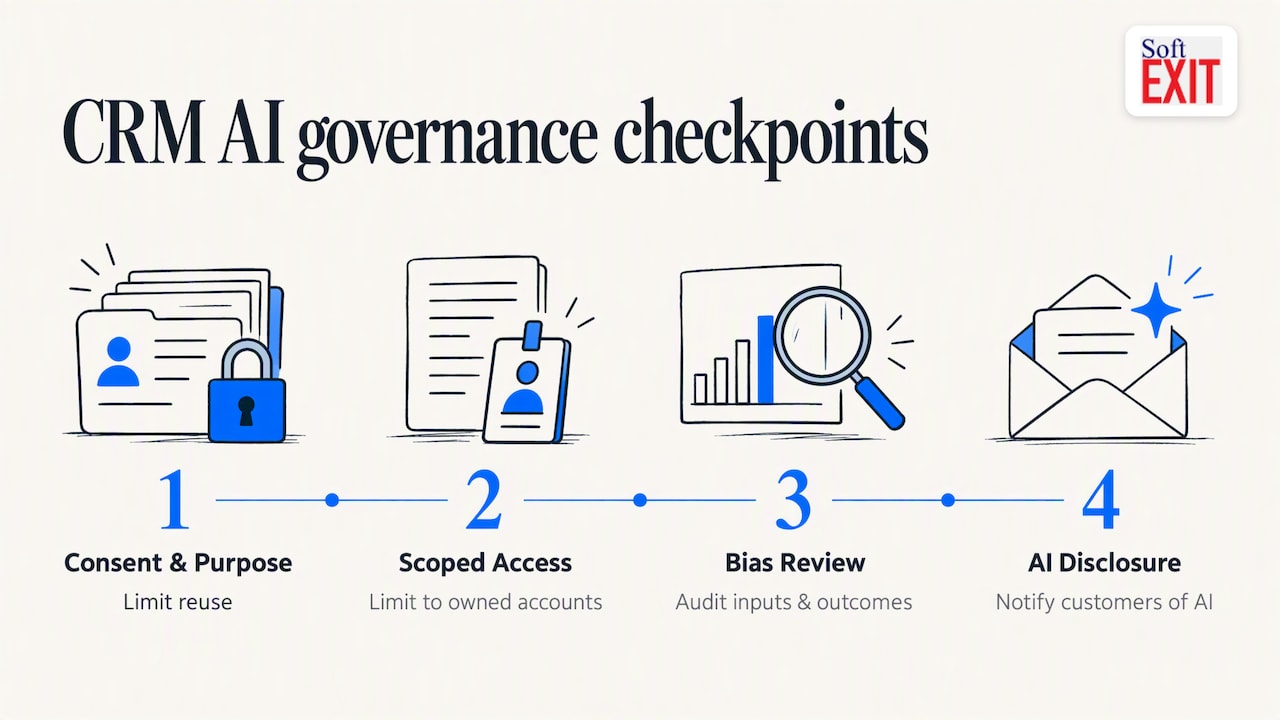
Bias is a quieter but real concern. A lead-scoring model trained on historical win data will reproduce whatever patterns, including unfair ones, were already in that history. Reviewing which inputs drive a score, and auditing outcomes periodically, catches this before it hardens into policy.
Transparency with customers matters too. A customer replying to what looks like a personal email from a rep deserves to know, at least in general terms, that a draft was AI-assisted. Quietly automating every customer touch while implying it is a human doing the work erodes trust faster than the efficiency gain is worth.
None of this requires abandoning AI in CRM. It requires treating customer data governance as a prerequisite, not an afterthought bolted on after a feature is already live.
7. Challenges and limitations of AI in CRM systems
AI in CRM runs into the same wall most enterprise software projects do: the data underneath it. A model trained on incomplete or inconsistent records will produce inconsistent, sometimes confidently wrong, outputs, and no amount of clever prompting fixes a dataset full of duplicate contacts and stale fields.
Adoption is a separate and often bigger obstacle. A feature that technically works but adds friction to a rep’s existing routine gets ignored. Reps abandon tools that feel like extra steps rather than fewer, which is why workflow redesign around the AI feature matters as much as the feature itself.
Explainability is a real limitation with generative features specifically. When an AI assistant drafts a customer response or suggests a next action, a rep needs to know enough about why to catch a mistake before it reaches a customer. A model that cannot show its reasoning puts the burden of catching errors entirely on a rushed human.
Integration complexity adds another layer: AI features are only as good as the connectors tying them to email, calendar, support tickets, and other systems, and a brittle integration breaks the data freshness that everything else depends on.
Finally, there is a cost and maintenance dimension that is easy to underestimate. Features built on AI-generated code can require ongoing patching and testing cycles that were not part of the original budget, a gap that configuration-based approaches are designed to avoid.
8. Future trends and innovations in AI-powered CRM
The clearest trend already underway is the shift from AI that waits to be asked toward AI that acts inside the flow of work. Agentic features that proactively brief a rep before a call, flag a deal at risk, or draft a follow-up without a prompt are moving from demo-stage to standard CRM functionality.
Expect tighter integration between CRM and the surrounding data environment: identity resolution and retrieval layers will keep improving so generative features stay grounded in verified records rather than producing a plausible-sounding guess. That reduces the hallucination risk that currently makes some teams cautious about generative drafting.
Governance tooling is likely to mature alongside the features themselves. As frameworks like the NIST Generative AI profile become more commonly referenced in procurement conversations, expect CRM vendors to build in audit trails, provenance tracking, and oversight dashboards as standard rather than optional add-ons.
No-code and low-code configuration is another direction worth watching closely, since it addresses a problem the current wave of AI coding assistants creates rather than solves: generated application code still needs testing, security review, and long-term maintenance. Platforms that use AI to configure existing, pre-built components instead of generating new code sidestep that overhead entirely, which is likely to become a more visible differentiator as teams tally the hidden cost of maintaining AI-written code.
9. Author perspective: recommended priorities for leaders adopting AI in CRM
If you take one thing from this article, make it this: fix your data and define your KPIs before you evaluate a single AI feature. Every failed AI-in-CRM rollout I have seen traces back to skipping that step, not to picking the wrong vendor.
For the next 90 days, I would run a data audit first, pick one narrow pilot (auto-enrichment or next-best-action tend to show value fastest), and name a single governance owner before the pilot goes live, not after. Resist the urge to automate everything at once. The organizations getting real value redesigned one workflow at a time and kept a human reviewing AI output until trust was earned, not assumed.
Over-automation is the quieter risk nobody budgets for. A rep who stops double-checking an AI-drafted email because it has been right ninety-nine times out of a hundred is exactly the setup where the hundredth mistake reaches a customer.
— James Edgell
10. Put AI-driven CRM configuration to work without the code risk
If the data and governance work above sounds right but you don’t want to inherit a pile of AI-generated code to maintain, that’s the gap we built SoftEXIT Studio to close. Our AI Architect configures your CRM from native platform components, tables, forms, dashboards, workflows, so you get a working application fast without introducing custom code that needs ongoing security review. There are no AI token charges to budget around, so the cost of building and expanding your CRM stays predictable as your team grows into it.
- Request a walkthrough of SoftEXIT CRM to see AI Architect configure a working application.
- Compare the Starter and Professional plans to find the right starting point for your team.
- Talk to our Professional Services team if you want a guided implementation rather than a self-serve setup.
FAQ
How can AI be used in CRM?
AI in CRM handles tasks like auto-enriching contact records, flagging the next best action for a rep, deduplicating records, auto-logging calls and emails, and drafting routine customer responses. The more advanced layer, agentic AI, takes this further by proactively briefing reps or triggering follow-up actions inside existing workflows.
What is the 30% rule for AI?
If you have encountered this term, it likely refers to an informal benchmark used by a specific consultancy or team rather than an industry standard.
Is CRM going to be replaced by AI?
No credible evidence points to AI replacing CRM systems outright. Instead, AI is being built into CRM platforms as a layer that automates data hygiene, scoring, and drafting, while the CRM itself remains the system of record for customer relationships.
Is there an AI CRM?
Most modern CRM platforms now include AI features such as predictive scoring, auto-enrichment, and generative drafting tools. Platforms built on no-code application layers, like SoftEXIT CRM, take a different approach by using AI to configure the CRM itself rather than generating application code, which keeps costs predictable since there are no per-token AI charges.
What should a CRM AI pilot track to prove value?
A pilot should track usage rate among reps, forecast accuracy, time-to-contact for new leads, and data freshness. McKinsey’s research found that workflow redesign and CEO-level oversight correlate more strongly with real financial impact than the AI feature itself.
Sources
- IBM study: AI spending expected to surge 52% beyond IT budgets as retail brands embrace enterprise-wide innovation
- The state of AI: how organizations are rewiring to capture value | McKinsey
- Artificial Intelligence Risk Management Framework: Generative Artificial Intelligence Profile (NIST)
- Agentic CRM in the flow of work: how AI is transforming sales and rebuilding customer trust (Microsoft)